This semester I took a digital photography class through the Harvard Extension School. My final project is this video, which consists of three time lapse sequences and 60 still images from around the Harvard campus. I shot everything using my Canon 60D, and used Photoshop, After Effects and Premiere Pro to edit.

AV, video production, photography and space exploration discussions
Showing posts with label video production. Show all posts
Showing posts with label video production. Show all posts
Sunday, December 18, 2011

Friday, October 28, 2011
Boston SuperMeet 2011

Last night the Boston Final Cut Pro User Group hosted the 2nd annual Boston SuperMeet at the Stuart Street Playhouse in downtown Boston. It was a dark and stormy night, with the threat of the first snow of the winter, so it was a great night to be indoors with a bunch of other video production nerds. My coworker, Kevin McGowan, and I arrived about an hour and a half before the show so we could walk around the exhibit floor and visit some of the vendor booths. I don't have any hard numbers, but it seems like there were more vendors this year than last year. It's a great opportunity to talk to some company reps and get some hands-on demos of gear and software.
 |
| Michael Horton and Daniel Berube hosted the evening |
Around 7pm we all headed into the theater to start the show. Hosts Daniel Berube and Michael Horton put together a great lineup for the Masters of Light and Illusion theme. I'm sure there will be video from the evening posted on the FCPUG SuperMeet YouTube channel, so I'll just post some pics and highlights from the evening.
 |
| Alexis Van Hurkman and Blackmagic DaVinci Resolve |
First up was Alexis Van Hurkman with a DaVinci Resolve demo. I'm always reminded of how little I know about advanced color correction when I watch demos from pros like Alexis. I think I'm finally motivated to download the free DaVinci Resolve Lite and try my hand at more advanced color correction.
 |
| Jem Schofield talking about the Canon EOS 1DX |
A couple of weeks ago Canon announced their latest flagship DSLR, the EOS 1DX, and Jem Schofield was at the SuperMeet to talk about using that camera for video production. Wonderful looking specs on that camera, but unfortunately I don't have $6500 to drop on a body. My real takeaway from Jem's talk is that I'm now turned onto his great website/blog, theC47. Some interesting tutorials on there. He said he has achieved his goal of posting five video tutorials per week! Jem closed by hinting that we should all pay attention on November 3rd for an important announcement by Canon. A 4K video camera, or a 5D refresh? We'll see.
 |
| Marc-André Ferguson with Autodesk Smoke |
Our next demo was an Autodesk Smoke demo from Marc-André Ferguson. This must be the seventh Smoke demo I've seen, and my opinion is still the same: it looks like a very powerful program, but just too much for what I'm doing. For those working in high end video/film production, I think this is a great program packed with features they will use. As always, I'm still baffled about the choices Autodesk made for the user interface on Smoke. Maybe once you use it regularly it starts to make more sense, but I just see it as a pretty uninviting interface to work with.
 |
| Corey Tedrow giving an Avid Media Composer 5.5 demo |
With so many video production pros giving up on Apple because of the Final Cut X mess, Avid seems to be welcoming all Final Cut converts with open arms. Our next demo was an Avid Media Composer 5.5 demo from Corey Tedrow. Avid always does a great job of pointing out all the Media Composer features that people were wishing for in the new Final Cut X. The statement that got the biggest reaction from the crowd was the announcement that you can now export ProRes files directly from the Media Composer timeline. With a handful of discounts being offered by Avid, I'm sure many Final Cut users will find themselves trying out the free 30 day trial version of Media Composer.
 |
| Film editor Andrew Weisblum |
The next presenter was an Avid sponsored talk from film editor Andrew Weisblum (Black Swan, The Wrestler, Fantastic Mr. Fox, The Darjeeling Limited). Andrew showed us the nightclub/drug scene from Black Swan and described how Avid products helped him collaborate with others in finishing that scene.
 |
| Walter Murch |
Our final presenter of the evening was Walter Murch. His resume is loaded with plenty of well known films, but some of the biggies he's edited are: Apocalypse Now, The English Patient, The Talented Mr. Ripley, Jarhead, and Ghost. I was really pleased to hear that he edited what I believe to be the only acceptable 3D film: Captain EO. I wasn't a film major, so this was the first time I had attended a talk from a major Hollywood film editor. I was surprised at how grounded Walter is. With all the major films he's worked on, and all the awards he's won, he could have easily turned into another Hollywood type with a major ego. Instead I got the total opposite impression from him. There was a kind of complex simplicity about Walter. I started to forget that I was listening to a three time Oscar winner when he began telling us that it's important to put one foot on a stool while editing to reduce lower back pain.
 |
| Walter Murch and his latest Final Cut timeline from the HBO film Hemingway & Gellhorn, consisting of 22 video tracks and 50 audio tracks |
I also liked the fact that Walter obviously has a wonderfully creative mind, but he's also very in touch with the technical aspects of editing. He really enjoyed telling us about the Arri Alexa that they used on his latest film, Hemingway & Gellhorn. I was very impressed with a picture of his Final Cut 7 timeline from that film (pictured above). 22 video tracks and 50 audio tracks is a project that I just can't wrap my head around.
 |
| Walter Murch and his famous standing editing station |
Walter also showed us a photo of one of his famous standing editing stations. He really attested to the idea that standing opens him up for a more creative workflow, rather than losing creative energy sitting at a desk.
Walter concluded his talk with mention of the new Final Cut X. He described it as a child that doesn't play well with others. He said that in June he sent Apple a letter outlining why he wouldn't be able to use Final Cut X on his projects. Walter's biggest complaints were the restructuring (aka lack of) audio tracks, no external monitoring and no SAN support. He admits that they're slowly resolving those issues, but he was also concerned that Apple essentially killed off Final Cut 7. If you would like to read a more detailed blog post about Walter's SuperMeet talk, Chris Portal wrote a nice post.
The evening concluded with the famous SuperMeet raffle with over $50,000 in prizes. Unfortunately, just like at the Vegas NAB SuperMeet, my coworker and left empty handed.
Once again, Daniel Berube put together an enjoyable Boston Final Cut Pro User Group meeting and SuperMeet. If you live in the Boston area and you're into video production, you should really attend the monthly BOSFCPUG meetings.
Thursday, July 28, 2011
Campus Technology Conference 2011

On July 26th, a couple of my coworkers and I ventured down to the Campus Technology Conference, held at Boston's Seaport World Trade Center. My job entails working with video, but the majority of my time is spent using projection and audio systems, as well as room control systems. This is the first year I was able to attend the Campus Technology Conference, which is shocking when you consider the fact that it's only a 30 minute subway ride from my office. We only attended the show floor (thanks to Crestron for the free tickets) since we didn't have the time or budget to commit to a few days of breakout sessions/classes. Many of the breakout sessions looked interesting, but the majority of them were really geared toward academic IT departments, and not really academic AV support departments. Since we didn't attend the InfoComm show this year in Orlando, I was interested in seeing some of the new products that were announced at that show.
The first booth we visited was ShareStream, which is a company started by a Harvard alum, David Weinstein. David was in the booth, so the four of us had a nice conversation about the services they provide. To use their words, ShareStream is "a turnkey system for creating, editing, storing, managing, and delivering rich media." In short, it's used to deliver lecture video to students. We work closely with our IT department for storing and delivering lecture video, so this is an area that we're interested in. We're mainly responsible for the acquisition and editing of lecture and event video on campus, then the IT folks store and deliver it via streaming servers. There's more to it, but that's a simplified version of our workflow. So naturally ShareStream provides services that we were interested in hearing about.
We wandered in and out of various booths, but our next big stop was a visit with our friends at the Crestron booth. We use many Crestron room control products on campus, so we're familiar with most of their offerings. We were especially interested in discussing the new products they announced at the InfoComm Show in June. The Crestron rep was pretty excited to tell us about their new Capture-HD system, which is used to capture and encode lecture video. There are quite a few lecture capture systems on the market these days, so it will be interesting to get our hands on a demo unit and try Crestron's solution. Crestron is making a big push for its DigitalMedia system that, in a nutshell, delivers video and audio signals around a room to multiple displays via CAT5 cable with Crestron switchers and signal processing equipment. They're more than just room control systems these days.

Our next stop was at the Kaltura booth. Kaltura is an online video platform that allows users to manager their online video content. It's very flexible (open source) and seems to have a great staff working behind the scenes in support. We had a nice conversation with one of the reps.

Wandering down the show floor aisle we came across another one of our good friends, Extron. In addition to Crestron control systems on campus, we have many, many rooms using Extron control systems. The first item I noticed in the Extron booth was a H.264 encoder that they introduced at InfoComm. It has multiple inputs and seems like a simple solution for H.264 encoding. We spent the rest of our time talking to the Extron reps about the new DVS 605 switcher. This is a new seamless switching scaler that they introduced at InfoComm. The key is that the switcher is DHCP compliant. The exchange of DHCP keys between video sources, switchers/other processors in the signal flow, and ultimately the display can really slow down switching between sources. When we're switching sources in a presentation setting, it needs to be seamless and fast, otherwise it looks very clunky and unprofessional. It'll be very nice to get our hands on a demo unit of the DVS 605.

Next up was a presentation by the Wowza Media Systems CEO, David Stubenvoll. David's talk was about implementing video stream, but of course he peppered it with information about the Wowza Media Server. Wowza can take H.264 content and deliver it to almost any device that can playback video, in many different formats. Flash, Silverlight, Apple HTTP, etc. Davis really knows his stuff about viodeo streaming, and Wowza looks like a great product. We later visited the Wowza booth, and this seems like another company that has a great support staff standing behind the product.
 |
| WolfVision VZ-9plus document camera |
We visited many booths as we made our way down the aisles, but our last big stop was the WolfVision booth. As far as document cameras go, WolfVision makes some exceptional products. If you're not familiar with document cameras, think about the old overhead projectors, just with a camera pointing down at the material, and a VGA or DVI output that can be connected to a projector. We have a few of their VZ-9plus document cameras already on campus, and I also use their EYE-12 camera to project live science demonstrations in the classroom on the projector. WolfVision makes great products. It's amazing how detailed the image is when you have the high res camera zoomed in all the way. You can see details on a dollar bill that you can't see with the naked eye. Great for the art department or some of our professors that use rare books in their teaching.
Even though the Campus Technology Conference is much smaller than the InfoComm show or NAB, they still offered a nice mix of exhibitors. I can't speak to the quality of the breakout sessions/classes, since we didn't take any. Maybe next year we'll have the time and budget to give them a try.
Friday, July 22, 2011
Boston Final Cut Pro User Group meeting recap: 7/21/11
 |
| The EP Levine store and location of this month's BOSFCPUG meeting |
Last night's Boston Final Cut Pro User Group meeting was an enjoyable evening of guest speakers, product demos, and on a 95 degree day, robust air conditioning. The event was held at EP Levine in Waltham. EP Levine is a camera store with many goodies for still photographers and those that shoot video with DSLRs. The also have a nice studio space, where the BOSFCPUG event was held. My coworkers, Kevin and Geoff, enjoyed digging through the cases of used lenses. Geoff couldn't pull the trigger on a tilt shift lens he was eyeing, but Kevin ended up making a purchase. As he mentioned, EP Levine's prices were comparable to what he found online for the same lens, and he has the piece of mind of buying from a local retailer.
One piece of news jumped out at me: Daniel Berube mentioned that the Boston SuperMeet is tentatively scheduled for October 20th, but the date may change to accommodate the schedule of a "special guest." Who could it be? Maybe Larry Jordan, or Kevin Smith (who was bumped from the Vegas SuperMeet), or maybe Apple executives begging us to stick with FCP X. We shall see. Last year's Boston SuperMeet was a very fun evening, as was this year's SuperMeet at NAB.
As usual, Daniel Berube worked very hard to put together another action packed evening for all of us. The evening's speakers started with Jay Ignaszewski from AJA, then Charles Roberts from Fitchburg State University, followed by Gary Oberbrunner from GenArts, and Steve Martin wrapped up the speaking portion of the event. The evening ended with a screening of DSLR shorts, and a raffle. Unfortunately, my coworkers and I needed to duck out after Steve Martin's talk, so I have no details about the screening or raffle for you.
Jay Ignaszewski started the evening with information about AJA's products interacting with Final Cut Pro X. There was a good deal of concern from the other BOSFCPUG members about external monitoring and exporting out to tape. This AJA document does a much better job than I can do of summing up what Jay talked about.
The next speaker was Charles Roberts, a faculty member at Fitchburg State University that teaches video production. I found Charles to be a very engaging speaker, with lots of enthusiasm for teaching. One comment that stuck with me is something that he stresses to his students: don't lose out on jobs because you only know one piece of NLE software, or because you're fiercely loyal to using only one NLE. Expand your knowledge so you're ready to step into any job and use any piece of video production software that they throw at you. As he said, there's many ways to get the same job done, and most times you don't get to choose what tools you have to use. The meat of Charles' talk focused on using FCP 7 to inject DSLR footage, send it to Avid Media Composer for edit, send it to Apple Color (with the help of an EDL) for grading, then complete the roundtrip back into FCP 7 for final export. I personally couldn't imagine me having the need to do this, but it was interesting to see the process. All in all, I hope to hear more from Charles at future BOSFCPUG meetings.
Next up was Gary Oberbrunner from GenArts demoing their Sapphire Edge effects package. GenArts is located right down the road from me in Cambridge, MA. They make some very impressive effects packages used by major film and video productions. Gary focused on the Sapphire Edge plug-in package, which, as he described, is 15 transitions and 4 filters. Even though that seems kind of limited, each transition and filter has numerous presets and settings that can be changed, giving you hundreds of pre-built looks. I was very impressed with the effects Gary showed us. Gary focused on using these Sapphire Edge plug-ins in FCP 7, because, as he showed us, they're still working out the kinks of integrating these plug-ins into FCP X. He showed us how FCP X unexpectedly quits when some of the plug-ins are used, so it's still very much in the beta testing stage. The Sapphire Edge package is $299 and includes a one year subscription to their FX Central website.
 |
| A crummy cell phone pic of Steve Martin presenting to all of us |
Steve's talk focused on common myths surrounding FCP X, but really just turned into a very helpful collection of tips and tricks to get us acclimated to the new interface and features. Since I have yet to install and use FCP X, this was a nice way for me to get motivated to start using it. I'll summarize some of the key points that stood out to me, but keep your eye on the BOSFCPUG webpage, since Daniel arranged to have Steve's entire talk recorded. I'm sure they're editing the video and will post it ASAP.
- FCP X and DSLR footage: Steve showed us the process of transcoding DSLR footage to ProRes in the background as you work. The "create optimized media" check box in the import window is your friend, if this is what you're looking to do.
- Turn a stereo audio clip into two mono tracks: control click on the stereo audio track and select "break apart clip items" to split into two mono tracks
- Steve showed us FCP X's ability to edit sub frame audio
- As goofy as the labeling is, Steve's demo of the "Ken Burns" button looks like a painless way to pan and zoom still images. Just a more user friendly method than doing it with keyframes.
- Steve showed us that when you paste effects in FCP X ("paste attributes" in FCP 7), you can't pick and choose which effects/attributes you do and don't want to paste. That was a nice feature of older FCP versions that has been eliminated from FCP X. You now just have to paste all the copied effects and turn off those you don't want in the inspector window.
- During the Q&A portion of the evening, someone asked Steve about preserving Photoshop layers when you import into FCP X. Unfortunately, the answer is that it won't do it. You can do it in Motion, just not directly in FCP X.
- Someone asked Steve about FCP X's multicam editing support, and he confirmed that even though it doesn't currently have that feature, it's something that Apple will integrate into a future update. No word on when, though. This is one of many reasons why we can't currently use FCP X for our projects.
- Steve ended his talk by presenting the idea of using the AirDisplay app on your iPad to wirelessly create a second monitor with your iPad. He said that there's a very slight, but hardly noticeable bit of lag on the iPad.
As I mentioned, we weren't able to stick around for the screening and raffle at the end of the evening. All in all, it was another informative and motivating BOSFCPUG meeting. As usual, I look forward to next month's meeting!
Wednesday, June 15, 2011
Boston Final Cut Pro User Group meeting recap: 6/14/11
 |
| View of Boston harbor from this month's BOSFCPUG meeting on the 33rd floor |
Another Boston Final Cut Pro User Group meeting is in the books, and as usual, it was an enjoyable evening. This month's meeting took place at the University of Massachusetts Club in Boston's financial district. I think Daniel Berube had to schedule this month's meeting a week early since he'll be in the U.K. next week for the London SuperMeet. Unfortunately, there wasn't any news about a Final Cut Pro X release, since there wasn't an announcement made at Apple's June 6th WWDC. This month's meeting featured Ken LaRue discussing Autodesk Smoke for Mac 2012, the always entertaining Bob Russo talking about Avid's Media Composer 5.5, , and Jay Ignaszewski talking about AJA's tapeless workflow solutions. As usual, the evening concluded with the Big Dig Raffle, which featured an AJA KiPro Mini.
I was especially interested in Bob's Media Composer presentation, since I use Premiere and Final Cut, and haven't had much exposure to Media Composer. I was also looking forward to hearing from Jay, since I enjoy keeping up with tapeless workflow solutions.
 |
| Ken LaRue talking Autodesk Smoke |
Ken LaRue started off the evening with an Autodesk Smoke demo. Ken is a great speaker, and ran a very nice demo. I have never used this program before, but this is the second demo I've seen of it. Ken kept pushing the fact that we all use multiple programs to get the job done (Final Cut, Photoshop, After Effects, etc.) and Smoke combines the power of those programs into one package. Smoke really provides some powerful tools for editing, motion graphics, 3D effects, titling, keying, color correction, motion tracking and Photoshop type painting tools. Here are some of the highlights from Ken's demo, along with some opinions from me:
- At first glance, the Smoke GUI is very cluttered and utilitarian. Ken stressed that as you use the program, you start to get more comfortable with the layout. Looking at it for the first time, you just see a screen cluttered with many buttons in no apparent logical order. Ken was using what looked to be a Wacom tablet and pen to navigate.
- Smoke offers very impressive tracking tools. Ken showed us some tracking demos, and Smoke handled multiple tracking points very quickly.
- There's lots of rendering to be done after you apply all of Smoke's various tools. Ken rendered everything, rather than show it in real time unrendered playback. He was using a nice Mac Pro with a powerful Nvidia graphics card (I forget what model he mentioned), so the renders were pretty fast.
- Obviously, Smoke integrates well with other Autodesk programs like 3D Studio Max and Maya. Ken was importing 3D objects created in 3D Studio Max and had the ability to manipulate them in Smoke.
- Smoke has node based aspects to it as you start to apply the available tools, so that node window can get very cluttered and hard to read. Ken flew around the node window very quickly, so I'm sure it's something that comes with using the program.
- The retail price for Smoke is $15,000, so their target market isn't the low end video production pro. Their demo video featured many high end post production houses using Smoke for feature films and national commercials.

 |
| Bob Russo discussing Avid Media Composer 5.5 |
The next speaker was Bob Russo talking about Avid Media Composer 5.5. The last time I heard Bob speak was at the November 2010 BOSFCPUG meeting at WGBH. I have never used any of Avid's products, so I was interested in getting an introduction to MC 5.5. Here are some highlights from Bob's talk, along with my opinions. Remember, I'm new to MC 5.5, so you might think "duh, they've had that for years" to some of my observations:
- MC 5.5 now supports the AJA IO Express to capture footage. To end a debate I had with a couple coworkers over a few beers one night, Bob pronounced it "A.J.A." (the letters), not "Ahh-Jaa" (phonetically).
- Bob started with a demo of combining multiple formats and varying frame rates on the same timeline.
- Bob continued on to show us a multicam edit. The process and interface looked very similar to multicam edits in Final Cut and Premiere.
- ScriptSync is Avid's tool for linking your media to a text file containing your script. Bob had footage shot for a very cheesy small budget film, along with the script. ScriptSync was able to process the text in the script and sync it with the same text spoken in the footage.
- Bob's next demo showed us how to manipulate clips in the timeline using the tools we're familiar with in FCP and Premiere: ripple, roll, etc. Bob also showed us that it's easy to simply click on a transition in the timeline to adjust duration.
- Bob threw in a little sales pitch for some control surfaces that will integrate well with MC 5.5. Avid purchased Euphonix a year ago, so those were the control surfaces featured.
- PhraseFind is a feature in MC 5.5 that will scan the audio in your media and catalog it to make a searchable database. It phonetically catalogs the dialogue, so Bob mentioned that you also need to think and type phonetically when you're searching. I imagine it has the same issues as text to speech conversion, but just in reverse.
 |
| (L to R) Bob, Ken and Jay Ignaszewski from AJA |
The last speaker of the evening was Jay Ignaszewski from AJA. Here are the highlights from Jay's presentation:
- Talking about the Ki Pro, Jay said "right now it's just ProRes". Does that mean that AJA is working on offering multiple codecs, like the Cinedeck Extreme that can record to ProRes, Avid's DNxHD and Cineform? Or it means nothing and I'm digging too much into his comment.
- Only a few compact flash card manufacturers are approved by AJA for use in the Ki Pro Mini. Obviously they've had issues with cheap cards not being able to keep up with the bandwidth required to capture ProRes 422 HQ (which is 220 Mbps).
- It's easiest to connect the Ki Pro Mini to a laptop via ethernet and make settings adjustments with the software interface. The screen on the unit looks pretty small.
As is customary at BOSFCPUG meetings, the evening concluded with the Big Dig Raffle. Daniel had the usual assortment of Focal Press books, FCP plug-in packages, Adobe Production Premium CS5.5, and an AJA Ki Pro Mini. I've been unlucky for the past few BOSFCPUG raffles, as well as the huge raffle at the NAB Vegas SuperMeet, but tonight my luck turned around. I won this little beauty:
 |
| Big Dig Raffle prize winner! |
 |
| Creepy |
Next month's Boston Final Cut Pro User Group meeting will focus on the newly released (hopefully on Tuesday) FCP X and will feature Steve Martin (the FCP trainer, not the comedian). Steve is a great trainer and I look forward to seeing him. My coworker, Kevin McGowan, took a couple Post Production World classes taught by Steve this year at NAB and really enjoyed them.
I'm a big fan of the BOSFCPUG, so if you live in the Boston area, keep an eye on their website for news about the July meeting. I hope to see you there!
Tuesday, June 7, 2011
Mediasonic ProRAID HFR2-SU3S2 review

I recently decided to move my four 1TB drive RAID5 setup out of my computer case and into an external enclosure. I use this RAID to store all the media for the current project I'm working on, while OS and programs are stored on a separate hard drive. I previously had the 4x1TB RAID5 in my computer case connected to my Gigabyte GA-X58A-UD3R motherboard's Intel ICH10R SATA controller, which has 3.0Gbps SATA connectors. I know that everyone recommends an external RAID controller for best performance, but cost was a factor. I was getting decent enough read and write speeds for the work I was doing, and I never had a problem with the controller dropping the RAID configuration, so I stuck with the motherboard's controller. I typically work with AVCHD 1080i60 (recorded by my Canon HF20 at 24mbps) and DVCPRO 720p60 footage (recorded on P2 media at 100mbps), and I was getting enough transfer speed to comfortably edit multicam timelines.
I now have a need to add another free standing hard drive to my system, so to free up room inside my case, I decided to get the four RAIDed drives out of there and into an external case. It was really tight with all those drives in my computer's case. This will also reduce case temps, increase airflow inside the case, and reduce power draw. Again, cost was a major consideration, so I had to focus on the cheaper external RAID enclosure options. I landed on Mediasonic's ProRAID HFR2-SU3S2, which was on sale for $129 at Newegg.
My first impression of the ProRAID is that it has a very solid feel to it. The unit holds four hard drives and has a built in RAID controller supporting 0/1/3/5/10 RAID levels. RAID levels are changed with a front panel button. The case is made of aluminum and the power connector is on the side of the unit, rather than the back, which is awkward. This unit has a built in, very quiet fan which you can set to three different speeds, or just leave it on an "auto" setting. The unit will also power up and down automatically as you start and shutdown your computer.
I had a very hard time configuring the ProRAID. Upon first power up I got an error LED on front panel and the RAID would not be recognized by Windows 7 Disk Management tool. I followed the manual's description of how to set it up using a RAID5 configuration, but the error LED remained on. I tried connecting it via eSATA and USB 3.0, but kept getting the same error LED. I tried a RAID0 configuration, and that worked, so there was hope that this thing wasn't a brick right out of the box. I switched back to RAID5 and the error LED was back, so I pulled out the drives, reseated them and mixed up their order in the case. Tried restarting and still got the error message. Randomly, after another restart, it was recognized by Windows and I never saw the error LED pop on again.
Now I was seeing a new issue: Windows Disk Management was showing an incorrect drive size. It was telling me that four 1TB drives in a RAID5 configuration was only 784GB. Obviously very wrong. The Intel software that shows the status of the Intel SATA controller on the motherboard was showing the correct usable size for a 4x1TB RAID5 config: 2.8TB. Windows Disk Management wouldn't allow me to format the RAID to any size larger than 784GB. I tried a full restart of my computer, and now the MediaSonic ProRAID was only recognizing three of the four hard drives in the RAID, but now it was showing a total size of 1.8TB, which is correct for a 3x1TB drive RAID5 config. Getting closer, but still not there. I did another pull of all the drives and reseated them. Now I tried connecting the ProRAID to another SATA controller on my motherboard (the JMicron JMB362 chip), since I had been connecting via eSATA to my motherboard's Intel ICH10R SATA controller up to this point. Connected to the JMicron eSATA chip, all of a sudden the ProRAID is finally recognizing all four hard drives and Disk Management is showing the correct size of 2.8TB. I initialized and formatted the RAID drives with ease. If you're reading this because you've purchased this device, make sure you use a partition style of GPT (GUID Partition Table) and a file system of NTFS. Also make sure to right click on the RAID in Device Manager, click on "properties", choose the "policies" tab and check the box next to "enable write caching on the device", otherwise you'll have abysmal write times. Not sure why this isn't checked by default when you format the drive, but it wasn't for me. I powered down the ProRAID, connected again to the eSATA port connected to the Intel SATA controller, and all is well.
Now that I got this sucker finally up and running, it's time to do some read and write speed tests. I used ATTO Disk Benchmark v.2.47. I'll post the ATTO tests results here for you to check out. All of these tests were done on completely empty, 7200 RPM drives.
 |
| ATTO speed test results: 4x1TB RAID5 residing inside my computer case and controlled by my motherboard's Intel ICH10R SATA controller |
The image above is my control, showing write and read speed test results when I still had my 4x1TB RAID5 housed inside my computer case and it was being controlled by my motherboard's Intel ICH10R SATA controller. The numbers on the left represent different size files (in KB) that ATTO transfers to measure write and read times. As you can see, pretty nice read times for a motherboard's SATA controller.
 |
| ATTO speed test results: 4x1TB RAID5 controlled by Mediasonic ProRAID HFR2-SU3S2 internal RAID controller and connected to an eSATA port controlled by my motherboard's Intel ICH10R SATA controller |
The image above shows the speed test results for the ProRAID connected to my comp via eSATA. The same four 1TB drives that were in my computer were moved to the ProRAID. I'm even connecting the ProRAID to my comp via an eSATA port that is connected to and controlled by the Intel ICH10R SATA controller on my motherboard. That's the same SATA controller that these four drives were connected to when they resided inside my computer case. The only difference here is that the RAID5 is being controlled by the Mediasonic's ProRAID internal RAID controller, rather than the Intel ICH10R's RAID controller. As you can see, much better write times with the ProRAID (which I read is a limitation on the Intel ICH10R chip), but the read times suffer and seem to cap out at 250MBps. When editing video, read times are very important, so I'm disappointed to see those drop. Still plenty of speed for the kind of video I edit, but more is always better.
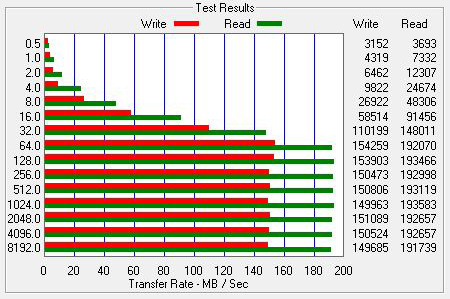 |
| ATTO speed test results: 4x1TB RAID5 controlled by Mediasonic ProRAID HFR2-SU3S2 internal RAID controller and connected to a USB 3.0 port on my motherboard |
The image above is a speed test connecting the ProRAID to my computer via a USB 3.0 connection. Both the ProRAID and my motherboard support USB 3.0, so I decided to give it a try. As you can see, I get slower write and read speeds than when I had the ProRAID connected via eSATA. USB 3.0 is supposed to have faster speeds than eSATA (5.0Gbps vs 3.0Gbps) but as you can see from my speed tests, I get better transfer speeds with the ProRAID using an eSATA connection. Theoretically I should be getting the same transfer speeds using eSATA and USB 3.0, since I'm not bumping up against the max bandwidth for either interface, so the only explanation here is that my Intel ICH10R SATA controller is simply more effecient than my motherboard's USB 3.0 controller. Gigabyte describes my motherboard's USB 3.0 chip as a "NEC chip", so I'm not sure what the specific model number is. I will also say that I haven't fished around for any new driver updates for the USB 3.0 chip, so that might improve speeds slightly.
 |
| ATTO speed test results: 4x1TB RAID5 controlled by Mediasonic ProRAID HFR2-SU3S2 internal RAID controller and connected to an eSATA port controlled by my motherboard's JMicron JMB362 SATA controller |
The image above is a speed test using the ProRAID connected to my computer via eSATA to another SATA controller on my motherboard: the JMicron JMB362 SATA controller. I knew that this SATA controller isn't as fast as the Intel ICH10R controller, and this image shows that.
So as you can guess, my conclusion is that I will use the ProRAID connected via eSATA to a port connected to the Intel ICH10R controller. I haven't had hours and hours of testing the ProRAID under real world editing conditions, but I can tell you that it I haven't run into any speed issues so far. It had no problem playing back three DVCPRO HD 720p60 streams for a multicam edit.
I really hate that I ran into these random issues getting the ProRAID initialized. I'm no A+ certified IT technician, but I do consider myself to be pretty tech and computer savvy. I could see most general users giving up if they had the same troubles I had getting the ProRAID up and running. Being a technician, I can't just accept it when a piece of electronics behaves randomly. I get nervous that it will decide to randomly crap out in the future on me, and of course, at the worst possible time. So far it's been pretty solid, but I'll keep you updated if I run into any problems with the Mediasonic ProRAID.
Thursday, June 2, 2011
Q&A with The Visualmakers producer and director: Paul Antico
On Wednesday, May 25th, the Boston Final Cut Pro Users Group held an event at Rule Camera. After great talks by Philip Hodgetts and Yan Shvalb, three short films created using DSLR cameras were screened. One of those films was produced and directed by Boston based filmmaker, Paul Antico. Paul screened a trailer for his upcoming documentary called The Visualmakers. I was very impressed with the trailer and I can't wait to see the finished film. I was so impressed that I asked Paul to take some time to do a little Q&A with me, and he was kind enough to agree.
Mike: "What inspired you to decide to produce this film?"
Paul: "As affordable digital cinema tools (mostly up until recently, HDSLRs) have come into use by independent creatives, I found that so many people online were concentrating on the gear, the ways to get jobs, the networking, and so on without pausing to think about why they do what they do.
I think that filmmaking (and really creativity in general) is an emotional endeavor in some ways - it an be technical but if you don't focus in on the emotion behind the story you are missing the point. The Visualmakers seeks to explore the motivation behind these filmmakers, offer some advice for people just starting, and shine a light on the process as an art and craft. Making independent film is not just checking boxes on a gear list.
As for the title "The Visualmakers" - it comes from a term I coined called Digital Visualmaking. The idea there was let's not call it HDSLR video making, or filmmaking, or even necessarily be limited to motion pictures at all. We are all making visuals using digital tools - photography, videography, cinema motion pictures, explorations of light, color, illustration and so on. We are all united in that we make visuals - hence the title (even if this particular doc focuses on "filmmaking".)"
Mike: "When did you start planning this production?"
Paul: "The doc kind of came together on a whim a month prior to NAB. I had planned to film at the show some interviews with various "names" in our little twitter-connected indie filmmaker group to put on my site needcreative.net. My site focuses on the creative process and technique, not just gear and I wanted to augment that. The Associate Producer on Visualmakers - Kira Macalpine - then asked me if I wanted to do more. Organically we discussed some ideas and the interviews turned into a documentary."
Mike: "Let's get the gear question out of the way: what cameras, lenses and audio accessories did you use, and what programs are you using for post production?"
Paul:
"Cameras:
Filmed with a Panasonic AF100, Canon 5D Mark II, Canon 7D, and Canon T2i
Lenses:
Lenses used include Nikon 50mm 1970's vintage, Zeiss ZE 50mm F1.4 and 35mm F2, Canon 17-40mm F4 L, Canon 24-104 IS F4L, Canon 85mm F1.4L, and Canon 100mm F2.8L IS Macro
Sound:
Mics: Sennheiser G2 and Sony UWP-V1 Wireless Lavaliers, Rode Video Mic and Video Mic Pro, Rode NTG-2, Azden Shotgun
Recording: Internal AF-100 and Zoom H4N
Rigs & Stabilization:
Manfrotto Stills and Video Tripods and Video Tripods, Manfrotto 501HDV Head * 701 HDV Head, Schatler Tripod and Head
Jag35 Field Runner, Zacuto Base Plate, Kessler Pocket Dolly Traveler V2.0
Lighting:
LitePanels Micro, Opteka 128LED On-Camera Lights, Promaster Reflector
Monitors:
Marshall 5" HDMI LCD Monitor
Edited with Apple Final Cut Pro 7
Motion Graphics - Apple Motion 4
Color by Red Giant Magic Bullet Looks
Timelapses modified using Adobe Lightroom and CHV Electronics Long Exposure Plugin"
Mike: "Are there any filmmakers that you wanted to include, but just couldn't schedule a time to interview them?"
Paul: "Yes. I wanted to get Nino Lietner and Den Lennie but I had to cap the production at 10 people for logistical reasons. Khalid Mothasseb and Jon Bregel of Next Level Pictures were scheduled to be in it as well but at the last minute, literally, got pulled into a production in Vegas and couldn't attend.
If I had to do it all over, I would have perhaps tried for some bigger names as well such as perhaps Gale Tattersall and Bob Primes and so on but in the first round I wanted to limit it to people we have heard of that were within our level of experience, although within a wide spectrum."
Mike: "What have been your biggest production and post production challenges?"
Paul: "Time. Or lack of it. Trying to find time to be at NABShow, network, see the show, and so on and get people to sit down for a proper interview was nearly impossible. I chose NAB because I knew everyone would be in the same place, but it was a nightmare trying to get everyone together. If it wasn't for their professionalism, this would never have happened.
Trying to find places to film was also a challenge. Everything was necessarily rushed and I wouldn't do it that way again.
This lack of time and rushing to get everything done also presents post production challenges, such as having to deal with difficult lighting and sound situations. And I am editing this alongside doing my own freelance work and a full time job for DHS, so it's exceedingly difficult to complete the piece staying true to my own vision and do it within a reasonable timeframe.
Sound has also been a challenge... see next question."
Mike: "Was it difficult capturing clean audio on the noisy NAB show floor?"
Paul: "Surprisingly, the best audio actually came from the show floor. No one expected this. We used the Sony UWP-V1 wireless mics which worked very well, but the key was mic placement. The mic is just out of frame right below the subject's mouth, which helped a lot.
We also tried to find a spot on the floor that had a predictable din - a constant level of noise. I applied some significant noise reduction but of course you can't get it all out. However people see that the subjects are being interviewed at a show so it all works well in the end.
The difficulty was the noise in the quiet hotel room. We had some significant interference that raised the noise floor. I have no idea where it was coming from. In the future in both cases I'll use a wired lav first and wireless as a backup."
Mike: "Were you able to enjoy the NAB show, or were you busy filming the whole time?"
Paul: "2 out of the 4 days were spent filming, and lots of work in between wrangling people. Afterwards was tough too, getting releases and sample footage and so forth. So as a result I didn't get to enjoy the show nearly as much as I wanted to, either during or afterwards networking-wise. I did go to many networking events and parties, and got to meet with people that way, but I missed a bunch of vendors I had wanted to meet with due to filming.
If I had to do it again, I would have scheduled all the filming for one day, and in a proper location. Or I wouldn't do it at all, at least not at NABShow."
Mike: "When is your expected release date for the film?"
Paul: "July. As in the end of July. It will be about 30 minutes, though I have a ton more footage that I may release online as "extras".
Soon a website will be up for the film: www.thevisualmakers.com"
Mike: "Who else has been very involved in helping you produce this film?"
Paul: "Here's the credit list:
Edited By PAUL ANTICO
Cinematography by PAUL ANTICO CHRIS LOUGHRAN BRYAN TOSH MIKE COLLINS and RYAN BROWN
Written By KIRA MACALPINE
Motion Graphics by MOTIONVFX and PAUL ANTICO
Directed by PAUL ANTICO
Produced by PAUL ANTICO
Associate Producer KIRA MACALPINE
Original Music by Jason Sidelinger
Special Thanks to Kira Macalpine, Jared Abrams, D-FOCUS, Sid Levin, Steve Weiss, and Rick Macomber"
Mike: "Other than releasing it on Vimeo, do you have any other plans for the
film? Festivals, screenings, etc?"
Paul: "Not at this time, however I have had a number of requests to talk about the film (for example, I will be showing a bit more of it in June at DV Expo east in NYC). And I've screened it at Boston's Final Cut Pro User's Group meetup and will do so at other similar venues. We may show on more than just Vimeo when released, but the primary purpose is to give back to the community online and perhaps encourage others to go out and start creating!"
Thursday, May 26, 2011
Boston Final Cut Pro User Group meeting recap: 5/25/11

My coworker, Kevin, and I attended the Boston Final Cut Pro Users Group meeting on May 25th, so I figured I would post a quick recap for all of you. The venue was Rule Boston Camera Rental, and as usual, Daniel Berube put together a fun and informative event. The featured speakers were Philip Hodgetts speaking about the new Final Cut Pro X and Yan Shvalb speaking about some new features in Adobe After Effects CS5.5. The evening ended with a few screenings of shorts made with DSLR cameras, and of course, a nice little raffle.
 |
| Crummy cell phone pic of Philip Hodgetts presenting at the 5/25 BOSFCPUG meeting |
Philip Hodgetts was invited to talk about the new features in FCP X, but since Apple's released no new news since the SuperMeet at NAB in April, Philip made it very clear that he would be talking about features talked about at SuperMeet, educated guesses he has, and complete speculation. He mentioned that he doesn't have a copy of the program to show, and even if he did, he would be bound by non-disclosure agreements from Apple. Since I was lucky enough to attend SuperMeet in Vegas, and I've read many articles and blog posts about FCP X, I really thought he would just be rehashing news that I already knew, but that turned out to not be the case. Philip's really examined all the FCP X news out there with a fine tooth comb, even going so far as transcribing the SuperMeet presentation and reviewing high def footage shot at SuperMeet to really explore every screenshot. Philip's not only a video production pro, but he also is a software programmer, so he really likes speculating on the new programming architecture of FCP X.
Again, much of this is simply educated guesses from Philip, but here's a quick list of his points that I found interesting:
- FCP X will work on any Intel based Mac. He heard from a beta tester that he was having good luck using it on a Mac Book Air.
- As you can see in this screenshot, there's an AJA KiPro listed using the H.264 codec, rather than the ProRes codec it actually records to. I'm sure it was just a mock up screenshot released by Apple and was a simple typo, but still funny.
- Even though many people are calling it iMovie Pro, FCP X doesn't share any code with iMovie. iMovie is QuickTime based, and FCP X isn't.
- FCP X is very metadata heavy. It relies on source (camera created) metadata, as well as derived (user created or auto created by FCP features like face detection) metadata. As you can see on his blog, Philip is very into metadata.
- You will be able to disable the footage auto correction features at ingest (audio correction, color correction, etc.)
- Rolling shutter correction will be included in the program
- Using keywording features in FCP X is essentially like creating a subclip. You will be able to tag a portion of your footage, creating a searchable subclip.
- In the motion options for a clip, there's actually a button labeled "Ken Burns effect", to add zoom and pan motion to stills. I guess that phrase is now a generally used term, like Kleenex.
- Philip thinks FCP X will be easier to use than previous versions of FCP, unfortunately resulting in less work for his friends that are FCP trainers.
- He heard (from an informed source) that there's still a way to create fixed audio tracks, so you can have set tracks for V.O, music, SFX, etc. Handy for those that have to output to something like ProTools for a final mix.
- Changing the speed of a clip will be much easier than in previous versions of FCP. No more clumsy speed changing graph.
- Philip did mention that some of his software programs that he's created will become obsolute because of new features in FCP X.
- He believes that the new program will incorporate gesture support via an external touch pad.
 |
| Crummy cell phone pic of Yan Shvalb presenting at the 5/25 BOSFCPUG meeting |
The second presenter of the evening was Yan Shvalb, telling us about some new features in Adobe After Effects CS5.5. He started by showing us a great wedding video that he created for a couple that had a destination wedding in the Bahamas. He shot the video using Canon 5D Mark II DSLR cameras. It was a very nice looking piece. Yan used a close up shot of the wedding rings on a twig to show us all AE's new Warp Stabilizer effect. I won't rehash all the features on here, but I will say that it's very impressive. Yan even used it to stabilize some shaky iPhone footage, and used the effect's rolling shutter correction to fix some iPhone jello.
Yan also showed us the new Camera Lens Blur effect in AE CS5.5. Rather than simply blurring your image like other blur effects, Camera Lens Blur will create a more realistic looking blur, as if it was created by an out of focus camera lens. Lights in your image will be blurred simulating the iris blades in a lens. Yan also used a ramp matte to control the location of the Camera Lens Blur effect, and give his image some great, simulated depth of field. You can animate that to give the effect of pulling focus. Yan is a very creative and knowledgable guy, and I look forward to hearing him speak again in the future.
The next portion of the evening was three screenings of shorts shot using DSLR cameras. The first screening was a trailer for The Visualmakers, which is a short film being produced and directed by Paul Antico. This short film will look at the creative video professionals that have embraced DSLR cameras to shoot video. It features interviews with many creative video pros, including Philip Bloom and Vincent Laforet, and was shot during the 2011 NAB convention in Vegas. I look forward to seeing this film, which has a target release in July and will be free on Paul's Vimeo page.
The next short was edited by Colin (sorry, didn't get his last name) and was a new video from The Super Secret Project. This comedy group produces some pretty funny videos that go viral, and they're based out of Boston. This screening was a Law & Order based music video that was very funny. Keep an eye on their YouTube page for it.
The final screening was a pretty moving short from Rick Macomber titled One Day on Earth 10-10-10 Salem. It was a great piece about a homeless man in Salem, Mass, that's dealing with overcoming alcoholism. Rick shot it using his Canon T2i.
The evening ended as BOSFCPUG meetings usually do, with a nice raffle. Unfortunately, I went home empty handed. The large prizes were a copy of DiVinci Resolve, and a copy of Adobe Production Premium CS5.5.
Daniel mentioned that future BOSFCPUG meetings will feature Adobe and Avid presentations, and the July meeting will be dedicated to FCP X, which will have (hopefully) been released in June. If you live in the Boston area and you're involved with video production, you should really attend the BOSFCPUG meetings. Don't let the name scare you, there's plenty of Avid and Adobe users there too. It's always an informative and inspiring evening.
Friday, May 20, 2011
Follow Friday: video production podcasts
Well, it's Friday again, so I figured I would stick with Twitter's "Follow Friday" theme. Last week I shared a list of all the video production blogs that I keep an eye on and this week I figured you might appreciate a list of the video production podcasts that I listen to.
The Terence and Philip Show
This podcast features Terence Curren, owner of Alpha Dogs post production facility, and Philip Hodgetts. I'm a big Philip Hodgetts fan, so of course I listen to this podcast. Actually, I seem to talk about Philip on a weekly basis on this blog, so I bet I'm starting to creep him out a bit! This podcast is usually a pretty informal discussion about the latest trends in the video production world. They start with a topic and usually seem to drift off on a tangent, but always keep it relevant and interesting. It's great to hear the thoughts of two industry professionals. Terence and Philip are pretty entertaining guys, so this podcast is defineltly worth checking out.
Digital Production Buzz
This podcast is hosted by Larry Jordan and Michael Horton. Larry is a certified trainer, hosts training webinars, writes a great blog, publishes a FCP newsletter, and is all over the video production world. Michael runs the Los Angeles Final Cut Pro User Group. This podcast is much more structured than The Terence and Philip Show. Larry and Michael usually have a handful of guest interviews on their podcast, and keep to a tighter schedule than other podcasts. It sounds more like a radio talk show, rather than an informal discussion show. Listening to this podcast really keeps me updated on what trends are popular in the video production industry.
The DV Show
This podcast is hosted by video production professional Brian Alves. To me, this podcast appeals to a slightly lower level production pro than The Terence and Philip Show or Digital Production Buzz. Some of the topics discussed on The DV Show are video production basics, and some of the people calling in with questions seem to be beginners. That being said, Brian also does a good job of including topics and questions geared toward those people that have had more experience in the video production industry. This podcast is a nice mix of discussion about current trends in the industry, gear talk, and general video production tips and tricks. Brian has a very professional sounding production, which adds to this podcast being a great listen.
Creative Cow Podcasts
I'm not a huge fan of video production podcasts that are strictly tutorials, but Creative Cow does a great job with their podcasts. I especially enjoy their podcast tutorials from Andrew Devis and Richard Harrington. These tutorial podcasts are well produced, and I always learn something from the production pros that host them.
Speaking of Creative Cow, I saw a forum post stating that they're planning on starting up the Creative Cow weekly podcast again and they're looking for someone to host it. Looking at the brief description, the format will be a weekly podcast, 15 minutes in length, discussing the week's news and will feature a short interview. I'm guessing the interview will usually be a representative from one of the many companies that advertise on Creative Cow. I look forward to subscribing to the weekly podcast when they get it up and running.
The Terence and Philip Show
This podcast features Terence Curren, owner of Alpha Dogs post production facility, and Philip Hodgetts. I'm a big Philip Hodgetts fan, so of course I listen to this podcast. Actually, I seem to talk about Philip on a weekly basis on this blog, so I bet I'm starting to creep him out a bit! This podcast is usually a pretty informal discussion about the latest trends in the video production world. They start with a topic and usually seem to drift off on a tangent, but always keep it relevant and interesting. It's great to hear the thoughts of two industry professionals. Terence and Philip are pretty entertaining guys, so this podcast is defineltly worth checking out.
Digital Production Buzz
This podcast is hosted by Larry Jordan and Michael Horton. Larry is a certified trainer, hosts training webinars, writes a great blog, publishes a FCP newsletter, and is all over the video production world. Michael runs the Los Angeles Final Cut Pro User Group. This podcast is much more structured than The Terence and Philip Show. Larry and Michael usually have a handful of guest interviews on their podcast, and keep to a tighter schedule than other podcasts. It sounds more like a radio talk show, rather than an informal discussion show. Listening to this podcast really keeps me updated on what trends are popular in the video production industry.
The DV Show
This podcast is hosted by video production professional Brian Alves. To me, this podcast appeals to a slightly lower level production pro than The Terence and Philip Show or Digital Production Buzz. Some of the topics discussed on The DV Show are video production basics, and some of the people calling in with questions seem to be beginners. That being said, Brian also does a good job of including topics and questions geared toward those people that have had more experience in the video production industry. This podcast is a nice mix of discussion about current trends in the industry, gear talk, and general video production tips and tricks. Brian has a very professional sounding production, which adds to this podcast being a great listen.
Creative Cow Podcasts
I'm not a huge fan of video production podcasts that are strictly tutorials, but Creative Cow does a great job with their podcasts. I especially enjoy their podcast tutorials from Andrew Devis and Richard Harrington. These tutorial podcasts are well produced, and I always learn something from the production pros that host them.
Speaking of Creative Cow, I saw a forum post stating that they're planning on starting up the Creative Cow weekly podcast again and they're looking for someone to host it. Looking at the brief description, the format will be a weekly podcast, 15 minutes in length, discussing the week's news and will feature a short interview. I'm guessing the interview will usually be a representative from one of the many companies that advertise on Creative Cow. I look forward to subscribing to the weekly podcast when they get it up and running.
Friday, May 13, 2011
Follow Friday: video production blogs
In keeping with the Twitter theme of "follow Friday", I figured I would write a post about all the video production and post production blogs that I read. I use Google Reader (a RSS reader) to keep up on all the updates to these blogs. If you don't use a RSS reader, I highly suggest you read up on them and give one a try. It thoroughly speeds up the process of keeping tabs on many different websites and blogs.
There's so many great video production blogs out there, so if you recommend some others I should check out, let me know in the comments.
Philip Bloom
He's a filmmaker that often uses DSLR cameras to shoot video. Very creative and entertaining guy, and seems to love to share his knowledge with others.
Philip Hodgetts
I've talked about him before on this blog, and I'll say it again: he's one of my favorite personalities in the video production world. I took a class taught by him at NAB's Post Production World and started to follow his blog. Very knowledgeable and entertaining to read.
Richard Harrington
I was introduced to Richard by seeing his posts on the Creative Cow forums and hearing him speak at a Boston FCP User Group meeting. I get lots of Photoshop and Adobe CS5 tips from Richard.
Gary Adcock
You've probably seen his posts and tutorials all over the Creative Cow forums. After hearing Gary speak at a Boston Final Cut Pro User Group meeting, I started following him.
Larry Jordan
Producing a podcast, blogging, training and hosting webinars, he might be one of the hardest working guys I've ever seen. He's a great source of FCP insight.
Walter Biscardi
Walter owns a production company in Georgia and has a very entertaining Twitter feed. Has great insights about FCP and the video production business in general.
Todd Kopriva
Todd works for Adobe and writes two great blogs that I read regularly: his After Effects blog and his Premiere Pro blog. I even took a Post Production World class taught by Todd.
Shane Hurlbut
Very creative cinematographer that's also into using DSLR cameras to shoot video. Plus, he was born and raised in the same town I'm from: Ithaca, NY.
Vincent Laforet
Another filmmaker that likes to use DSLR cameras to shoot video. Very creative guy and also has a nice page listing the gear that he uses.
Jason Konoza
An Avid editor working north of the border for CTV, and all around nice guy.
Eric Wise
He's a FCP editor that writes a great blog called Splice Vine.
Scott Simmons
He has the Twitter username editblog, so how can I not follow him? Very active editor and great writer.
Kevin McGowan
I can't leave him off the list...he's my coworker! He's a DSLR lovin' guy and the first person I call when I have a camera related question.
Triple Exposure
After reading Philip Bloom's blog, I started to get interested in time lapse photography. In April, Richard Harrington and Scott Bourne started this interesting blog talking about time lapse, HDR and panoramic photography.
There's so many great video production blogs out there, so if you recommend some others I should check out, let me know in the comments.
Philip Bloom
He's a filmmaker that often uses DSLR cameras to shoot video. Very creative and entertaining guy, and seems to love to share his knowledge with others.
Philip Hodgetts
I've talked about him before on this blog, and I'll say it again: he's one of my favorite personalities in the video production world. I took a class taught by him at NAB's Post Production World and started to follow his blog. Very knowledgeable and entertaining to read.
Richard Harrington
I was introduced to Richard by seeing his posts on the Creative Cow forums and hearing him speak at a Boston FCP User Group meeting. I get lots of Photoshop and Adobe CS5 tips from Richard.
Gary Adcock
You've probably seen his posts and tutorials all over the Creative Cow forums. After hearing Gary speak at a Boston Final Cut Pro User Group meeting, I started following him.
Larry Jordan
Producing a podcast, blogging, training and hosting webinars, he might be one of the hardest working guys I've ever seen. He's a great source of FCP insight.
Walter Biscardi
Walter owns a production company in Georgia and has a very entertaining Twitter feed. Has great insights about FCP and the video production business in general.
Todd Kopriva
Todd works for Adobe and writes two great blogs that I read regularly: his After Effects blog and his Premiere Pro blog. I even took a Post Production World class taught by Todd.
Shane Hurlbut
Very creative cinematographer that's also into using DSLR cameras to shoot video. Plus, he was born and raised in the same town I'm from: Ithaca, NY.
Vincent Laforet
Another filmmaker that likes to use DSLR cameras to shoot video. Very creative guy and also has a nice page listing the gear that he uses.
Jason Konoza
An Avid editor working north of the border for CTV, and all around nice guy.
Eric Wise
He's a FCP editor that writes a great blog called Splice Vine.
Scott Simmons
He has the Twitter username editblog, so how can I not follow him? Very active editor and great writer.
Kevin McGowan
I can't leave him off the list...he's my coworker! He's a DSLR lovin' guy and the first person I call when I have a camera related question.
Triple Exposure
After reading Philip Bloom's blog, I started to get interested in time lapse photography. In April, Richard Harrington and Scott Bourne started this interesting blog talking about time lapse, HDR and panoramic photography.
Subscribe to:
Posts (Atom)