Showing posts with label NAB. Show all posts

Thursday, July 28, 2011

Campus Technology Conference 2011


On July 26th, a couple of my coworkers and I ventured down to the Campus Technology Conference, held at Boston's Seaport World Trade Center.  My job entails working with video, but the majority of my time is spent using projection and audio systems, as well as room control systems.  This is the first year I was able to attend the Campus Technology Conference, which is shocking when you consider the fact that it's only a 30 minute subway ride from my office.  We only attended the show floor (thanks to Crestron for the free tickets) since we didn't have the time or budget to commit to a few days of breakout sessions/classes.  Many of the breakout sessions looked interesting, but the majority of them were really geared toward academic IT departments, and not really academic AV support departments.  Since we didn't attend the InfoComm show this year in Orlando, I was interested in seeing some of the new products that were announced at that show.

The first booth we visited was ShareStream, which is a company started by a Harvard alum, David Weinstein.  David was in the booth, so the four of us had a nice conversation about the services they provide.  To use their words, ShareStream is "a turnkey system for creating, editing, storing, managing, and delivering rich media."  In short, it's used to deliver lecture video to students.  We work closely with our IT department for storing and delivering lecture video, so this is an area that we're interested in.  We're mainly responsible for the acquisition and editing of lecture and event video on campus, then the IT folks store and deliver it via streaming servers.  There's more to it, but that's a simplified version of our workflow.  So naturally ShareStream provides services that we were interested in hearing about.

We wandered in and out of various booths, but our next big stop was a visit with our friends at the Crestron booth.  We use many Crestron room control products on campus, so we're familiar with most of their offerings.  We were especially interested in discussing the new products they announced at the InfoComm Show in June.  The Crestron rep was pretty excited to tell us about their new Capture-HD system, which is used to capture and encode lecture video.  There are quite a few lecture capture systems on the market these days, so it will be interesting to get our hands on a demo unit and try Crestron's solution.  Crestron is making a big push for its DigitalMedia system that, in a nutshell, delivers video and audio signals around a room to multiple displays via CAT5 cable with Crestron switchers and signal processing equipment.  They're more than just room control systems these days.


Our next stop was at the Kaltura booth.  Kaltura is an online video platform that allows users to manager their online video content.  It's very flexible (open source) and seems to have a great staff working behind the scenes in support.  We had a nice conversation with one of the reps.


Wandering down the show floor aisle we came across another one of our good friends, Extron.  In addition to Crestron control systems on campus, we have many, many rooms using Extron control systems.  The first item I noticed in the Extron booth was a H.264 encoder that they introduced at InfoComm.  It has multiple inputs and seems like a simple solution for H.264 encoding.  We spent the rest of our time talking to the Extron reps about the new DVS 605 switcher.  This is a new seamless switching scaler that they introduced at InfoComm.  The key is that the switcher is DHCP compliant.  The exchange of DHCP keys between video sources, switchers/other processors in the signal flow, and ultimately the display can really slow down switching between sources.  When we're switching sources in a presentation setting, it needs to be seamless and fast, otherwise it looks very clunky and unprofessional.  It'll be very nice to get our hands on a demo unit of the DVS 605.


Next up was a presentation by the Wowza Media Systems CEO, David Stubenvoll.  David's talk was about implementing video stream, but of course he peppered it with information about the Wowza Media Server.  Wowza can take H.264 content and deliver it to almost any device that can playback video, in many different formats.  Flash, Silverlight, Apple HTTP, etc.  Davis really knows his stuff about viodeo streaming, and Wowza looks like a great product.  We later visited the Wowza booth, and this seems like another company that has a great support staff standing behind the product.

WolfVision VZ-9plus document camera

We visited many booths as we made our way down the aisles, but our last big stop was the WolfVision booth.  As far as document cameras go, WolfVision makes some exceptional products.  If you're not familiar with document cameras, think about the old overhead projectors, just with a camera pointing down at the material, and a VGA or DVI output that can be connected to a projector.  We have a few of their VZ-9plus document cameras already on campus, and I also use their EYE-12 camera to project live science demonstrations in the classroom on the projector.  WolfVision makes great products.  It's amazing how detailed the image is when you have the high res camera zoomed in all the way.  You can see details on a dollar bill that you can't see with the naked eye.  Great for the art department or some of our professors that use rare books in their teaching.

Even though the Campus Technology Conference is much smaller than the InfoComm show or NAB, they still offered a nice mix of exhibitors.  I can't speak to the quality of the breakout sessions/classes, since we didn't take any.  Maybe next year we'll have the time and budget to give them a try.

Thursday, June 2, 2011

Q&A with The Visualmakers producer and director: Paul Antico


On Wednesday, May 25th, the Boston Final Cut Pro Users Group held an event at Rule Camera.  After great talks by Philip Hodgetts and Yan Shvalb, three short films created using DSLR cameras were screened.  One of those films was produced and directed by Boston based filmmaker, Paul Antico.  Paul screened a trailer for his upcoming documentary called The Visualmakers.  I was very impressed with the trailer and I can't wait to see the finished film.  I was so impressed that I asked Paul to take some time to do a little Q&A with me, and he was kind enough to agree.


Mike:  "What inspired you to decide to produce this film?"

Paul:  "As affordable digital cinema tools (mostly up until recently, HDSLRs) have come into use by independent creatives, I found that so many people online were concentrating on the gear, the ways to get jobs, the networking, and so on without pausing to think about why they do what they do.

I think that filmmaking (and really creativity in general) is an emotional endeavor in some ways - it an be technical but if you don't focus in on the emotion behind the story you are missing the point. The Visualmakers seeks to explore the motivation behind these filmmakers, offer some advice for people just starting, and shine a light on the process as an art and craft. Making independent film is not just checking boxes on a gear list.

As for the title "The Visualmakers" - it comes from a term I coined called Digital Visualmaking. The idea there was let's not call it HDSLR video making, or filmmaking, or even necessarily be limited to motion pictures at all. We are all making visuals using digital tools - photography, videography, cinema motion pictures, explorations of light, color, illustration and so on. We are all united in that we make visuals - hence the title (even if this particular doc focuses on "filmmaking".)"


Mike:  "When did you start planning this production?"

Paul:  "The doc kind of came together on a whim a month prior to NAB. I had planned to film at the show some interviews with various "names" in our little twitter-connected indie filmmaker group to put on my site needcreative.net. My site focuses on the creative process and technique, not just gear and I wanted to augment that.  The Associate Producer on Visualmakers - Kira Macalpine - then asked me if I wanted to do more. Organically we discussed some ideas and the interviews turned into a documentary."


Mike:  "Let's get the gear question out of the way:  what cameras, lenses and audio accessories did you use, and what programs are you using for post production?"

Paul:  
"Cameras:
Filmed with a Panasonic AF100, Canon 5D Mark II, Canon 7D, and Canon T2i

Lenses:
Lenses used include Nikon 50mm 1970's vintage, Zeiss ZE 50mm F1.4 and 35mm F2, Canon 17-40mm F4 L, Canon 24-104 IS F4L, Canon 85mm F1.4L, and Canon 100mm F2.8L IS Macro

Sound:
Mics: Sennheiser G2 and Sony UWP-V1 Wireless Lavaliers, Rode Video Mic and Video Mic Pro, Rode NTG-2, Azden Shotgun
Recording: Internal AF-100 and Zoom H4N

Rigs & Stabilization:
Manfrotto Stills and Video Tripods and Video Tripods, Manfrotto 501HDV Head * 701 HDV Head, Schatler Tripod and Head
Jag35 Field Runner, Zacuto Base Plate, Kessler Pocket Dolly Traveler V2.0

Lighting:
LitePanels Micro, Opteka 128LED On-Camera Lights, Promaster Reflector

Monitors:
Marshall 5" HDMI LCD Monitor

Edited with Apple Final Cut Pro 7
Motion Graphics - Apple Motion 4
Color by Red Giant Magic Bullet Looks
Timelapses modified using Adobe Lightroom and CHV Electronics Long Exposure Plugin"


Mike:  "Are there any filmmakers that you wanted to include, but just couldn't schedule a time to interview them?"

Paul:  "Yes. I wanted to get Nino Lietner and Den Lennie but I had to cap the production at 10 people for logistical reasons. Khalid Mothasseb and Jon Bregel of Next Level Pictures were scheduled to be in it as well but at the last minute, literally, got pulled into a production in Vegas and couldn't attend.

If I had to do it all over, I would have perhaps tried for some bigger names as well such as perhaps Gale Tattersall and Bob Primes and so on but in the first round I wanted to limit it to people we have heard of that were within our level of experience, although within a wide spectrum."


Mike:  "What have been your biggest production and post production challenges?"

Paul:  "Time. Or lack of it. Trying to find time to be at NABShow, network, see the show, and so on and get people to sit down for a proper interview was nearly impossible. I chose NAB because I knew everyone would be in the same place, but it was a nightmare trying to get everyone together. If it wasn't for their professionalism, this would never have happened.

Trying to find places to film was also a challenge. Everything was necessarily rushed and I wouldn't do it that way again.

This lack of time and rushing to get everything done also presents post production challenges, such as having to deal with difficult lighting and sound situations. And I am editing this alongside doing my own freelance work and a full time job for DHS, so it's exceedingly difficult to complete the piece staying true to my own vision and do it within a reasonable timeframe.

Sound has also been a challenge... see next question."


Mike:  "Was it difficult capturing clean audio on the noisy NAB show floor?"

Paul:  "Surprisingly, the best audio actually came from the show floor. No one expected this. We used the Sony UWP-V1 wireless mics which worked very well, but the key was mic placement. The mic is just out of frame right below the subject's mouth, which helped a lot.

We also tried to find a spot on the floor that had a predictable din - a constant level of noise. I applied some significant noise reduction but of course you can't get it all out. However people see that the subjects are being interviewed at a show so it all works well in the end.

The difficulty was the noise in the quiet hotel room. We had some significant interference that raised the noise floor. I have no idea where it was coming from. In the future in both cases I'll use a wired lav first and wireless as a backup."


Mike:  "Were you able to enjoy the NAB show, or were you busy filming the whole time?"

Paul:  "2 out of the 4 days were spent filming, and lots of work in between wrangling people. Afterwards was tough too, getting releases and sample footage and so forth. So as a result I didn't get to enjoy the show nearly as much as I wanted to, either during or afterwards networking-wise. I did go to many networking events and parties, and got to meet with people that way, but I missed a bunch of vendors I had wanted to meet with due to filming.

If I had to do it again, I would have scheduled all the filming for one day, and in a proper location. Or I wouldn't do it at all, at least not at NABShow."


Mike:  "When is your expected release date for the film?"

Paul:  "July. As in the end of July. It will be about 30 minutes, though I have a ton more footage that I may release online as "extras".

Soon a website will be up for the film: www.thevisualmakers.com"


Mike:  "Who else has been very involved in helping you produce this film?"

Paul:  "Here's the credit list:

Edited By PAUL ANTICO
Cinematography by PAUL ANTICO  CHRIS LOUGHRAN  BRYAN TOSH   MIKE COLLINS and RYAN BROWN
Written By KIRA MACALPINE
Motion Graphics by MOTIONVFX and PAUL ANTICO
Directed by PAUL ANTICO
Produced by  PAUL ANTICO
Associate Producer KIRA MACALPINE
Original Music by Jason Sidelinger

Special Thanks to Kira Macalpine, Jared Abrams, D-FOCUS, Sid Levin, Steve Weiss, and Rick Macomber"


Mike:  "Other than releasing it on Vimeo, do you have any other plans for the
film?  Festivals, screenings, etc?"


Paul:  "Not at this time, however I have had a number of requests to talk about the film (for example, I will be showing a bit more of it in June at DV Expo east in NYC). And I've screened it at Boston's Final Cut Pro User's Group meetup and will do so at other similar venues. We may show on more than just Vimeo when released, but the primary purpose is to give back to the community online and perhaps encourage others to go out and start creating!"

Wednesday, April 27, 2011

Blackmagic HyperDeck Studio and Shuttle

Image:  Blackmagic HyperDeck Studio

Image:  Blackmagic HyperDeck Shuttle
I'll preface this post by saying that this isn't a product review, since I've never actually used either of these devices.  We're in the market for a tapeless recording system, so I spent the morning looking at the Blackmagic site reading about these two pieces of gear.  I figured I would pass along my first impressions.

In the beginning of April 2011, Blackmagic announced production of the HyperDeck Studio and Shuttle.  In a nutshell, both of these devices will record uncompressed 10-bit 4:2:2 video (in a Quicktime wrapper) on removable SSD drives through SD/HD-SDI or HDMI inputs.  The Shuttle is intended to be a field recorder and will record to one SSD.  The Studio is a rack mounted unit that allows recording to two drives.  The Studio unit also has a small LCD preview monitor built in.    

At first glance, the price seems great for these two:  $995 for the Studio and $345 for the Shuttle.  The one thing to keep in mind is that they don't come with any SSD drives, and uncompressed video takes up lots of hard drive space.  As Dan May from Blackmagic explains at the NAB Show 2011, one minute of 1080i60 uncompressed 10-bit video will consume about 10GB of hard drive space.  As Dan said, using these units for shorter field recording would be fine, but long form recording would be a bear with all that uncompressed video piling up.  We're really looking for a tapeless recording solution to record longer events, like two hour lectures.  Even though we could swap hard drives in and out of the Studio deck for infinite recording, we don't have a workflow that would allow us to dump those drives to a larger storage solution while we're recording the event.  That means that we'll have to have plenty of SSD drives on hand, and at almost $500 for a 256GB SSD drive (which would only get us 25 minutes of 1080i60), the cost of this starts to add up.  Having the option to record to a compressed codec (like ProRes) would really help control the size of the recorded video, but you don't have that option with either the Shuttle or Studio.

Another downside that I noticed is neither the Shuttle or the Studio units have dedicated audio inputs.  Both capture audio that's input through the SDI or HDMI connectors.  I suppose I can see that being the case with the Shuttle due to space limitations on the unit, but the Studio should really have some balanced audio inputs.  I think this is where something like the AJA KiPro or KiPro Mini really jumps ahead of the HyperDeck Shuttle and Studio.

All in all, these are great little devices, but have a couple of flaws that will hold them back.  Hopefully in the future, Blackmagic pays the licensing fees and includes the option to record to a high quality compressed codec, like ProRes or DNxHD.

Friday, April 22, 2011

NAB 2011: One last update

My coworker, Kevin McGowan, sent me a couple of pictures of me at the NAB 2011 show, so I thought I would share: 


I'm posing with the Christie CP4220 DLP cinema projector.  It's a 22,000 lumen 4K projector!  Any projector with a chimney is A-OK in my book.


I'm showing off an Anchor Liberty powered speaker.  I might look like I'm frowning, but we actually use lots of Liberty speakers at work for events around campus.

Wednesday, April 20, 2011

Apple's getting what they wanted from the Final Cut Pro X preview

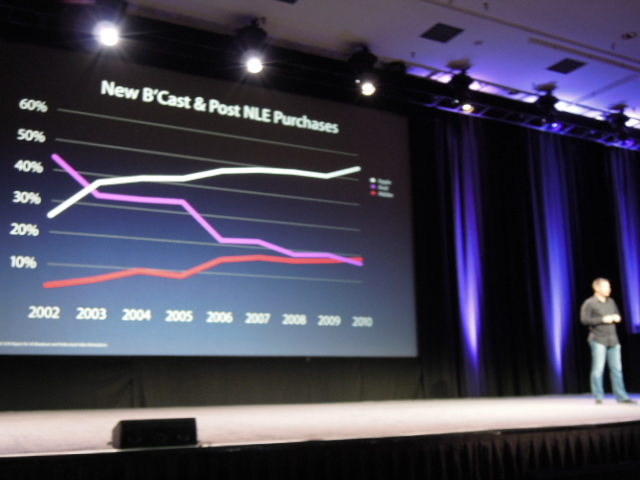
As Larry Jordan stresses in his great blog post, Apple's goal of last week's Final Cut Pro X preview at SuperMeet was to get a feel for how this new version will be received, and wasn't an official software release.  Their goal was to not only to get people's reactions on specific features, but to to test the waters and see if they're going to be alienating a large group of pro users with this new version.  With Adobe adding more useful features to the Production Premium suite, and Avid offering a MC5.5 discount to current Final Cut users, this has to be in the back of Apple's mind.  Even though Apple showed a graph (photo courtesy of Eric Reagan's post) depicting their dominance over Avid and Adobe, they must be slightly concerned that a poorly received FCP X will make that white line start to decline.

Related to that, those of you that are yelling about how Apple is now trying to market Final Cut to the consumer market (only $299, iMovie ripoff, etc.), rather than the pro market, can calm down a bit.  Why would Apple waste their time presenting to a room full of professional users if that won't be one of their target demographics?

Looks like they're getting exactly what they wanted: plenty of reactions from pro users, with piles of opinions coming in from every direction.  I'm guessing that some Apple interns and assistants are feverishly compiling blog posts, tweets, and other opinions splattered about the interwebs concerning the FCP X preview. 

As annoying as it all is, even all the crazy speculation that everyone's throwing out there is helpful input to Apple, since that's the wish list and hate list for most people.  If it's too late to change some of the features that everyone's complaining about or asking for, Apple could at least change the focus of their marketing by paying attention to the features that everyone's most excited about.  I guess we'll just have to wait until June to see how it all plays out.

Saturday, April 16, 2011

NAB 2011: Post Production World

Well, my very first NAB Show has come and gone, and in a nutshell, I had a blast.  Walking the exhibit floor was obviously important, but my main focus for the week was to immerse myself in the Post Production World classes.  My coworker, Kevin McGowan, and I arrived in Vegas on Friday night, and stayed through Thursday night.  We figured that we would make the most of our first trip to the NAB Show.  It was a tiring week, but well worth the trip, money and effort.

I ended up taking 15 PPW classes during the week, and listened to two of the PPW keynote lectures.  Not only did I learn piles of new info about many facets of video post production, but it was very motivating being around such stellar instructors as Abba Shapiro, Jeff Greenberg, Philip Hodgetts and Luisa Winters.  Heck, even the motivation to start this blog came from a class with Philip Hodgetts!  These folks could absolutely hold my attention for a three hour class with great teaching and technical skills.  They also really opened my mind up to leaning about aspects of post production that I hadn't previously thought about diving into.  Jeff Greenberg actually has me excited to order a 450 page book about video compression!  I'm pretty pumped about post production right now.

I'm going to make every attempt I can to attend the PPW classes again in the future.  With the upcoming Final Cut Pro X release, the PPW FCP classes will be packed in 2012!

For those of you that are thinking of taking PPW classes, here's a list of things to remember:

1)  Bring a sweater...it's freaking cold in those rooms.
2)  Do your research before you go.  Pour through all the class descriptions and choose what class you will take, as well as a couple of alternates.  You can also leave a class and walk to another if you quickly determine it's just not for you.
3)  Take notes during the classes, but also create a "to do" list.  I have a huge list of software to download, websites to look up, podcasts and blogs to subscribe to, and books to buy....all suggested by the PPW instructors.
4)  Don't skip the PPW keynotes.  Both of them were very interesting lectures to listen to from Hollywood editors.
5)  Please don't ask those super specific questions about why your hard drive is making a clicking sound, or why Premiere crashes each time your cat walks across your keyboard.  It really slows down the entire class, but most of the instructors were great in diffusing those questions and pushing forward.
6)  Use the Creative Cow NAB Expo forum to ask questions while you're doing your pre-show research.
7)  You don't have to stick to a specific track.  As you can see below, I jumped all over between Final Cut, Adobe, and many other tracks.

If you're wondering, here's the list of PPW classes (with instructors) that I took:

Boot Camp:  Getting Started with Video Compression - Jeff Greenberg
From Expert to Master: Advanced Techniques for Final Cut Pro - Jeff Greenberg and Abba Shapiro
Color Correction with Final Cut Pro - Abba Shapiro
Live Streaming Solutions - Alex Lindsay
Optimizing Performance for Adobe Production Premium - Todd Kopriva
Great Shot Composition Every Time - Douglas Spotted Eagle
Cutting Edge Compression Techniques - Jeff Greenberg
Documentary Production Techniques - Hicks/Balog
Lightweight Lighting Solutions for Mobile Productions - James Ball
Getting Started with After Effects - Luisa Winters
Dynamic Noise Reduction and Audio Clean-up - Jeffery Fisher
The New Now: How to Grow Your Production or Post Production Business - Philip Hodgetts
Advanced Techniques for Premiere Pro - Luisa Winters
Mastering the Adobe Media Encoder - Ian Robinson
Color Correction Using Premiere Pro & After Effects - Luisa Winters

 Image:  PPW 4/10/11 keynote address: Chad Beck (editor of Inside Job)

NAB 2011: SuperMeet and the Final Cut Pro X announcement

I was one of the lucky people to attend the 2011 Final Cut Pro User Group SuperMeet event on the Tuesday of the NAB Show.  We were expecting to hear Kevin Smith and a handful of other video production professionals speak, but a week before the event, it was announced that a "special guest" had bumped all the speakers with a "special announcement."  It was obvious that it would be Apple making an announcement about the new Final Cut Pro X.  The event sold out, they had to add more seats, and all of a sudden this was the hottest ticket to have at NAB.

As we were entering the Bally's Event Center, there were even people in the hallway asking if anyone had extra tickets to sell.  You would think it was a Justin Beiber concert.  After getting our lanyards and badges, we milled around the SuperMeet exhibit floor for about an hour.  Quite a few vendors had booths set up and it was easier to speak to them here rather on the noisy, crowded NAB exhibit floor.  We bought $10 of extra raffle tickets, hopped on line (it was more a large mob of people) and waited for the theater to open.

Right around 7pm the lights dimmed, the Apple logo appeared on the projection screen, and all of us video nerds cheered.


Apple's Peter Steinauer and Randy Ubillos walked us through a Keynote presentation listing all the new features, and a decent demo of the software.  It was all just a preview the left many unanswered questions, but it really looks like an exciting piece of software.  For those that are calling it iMovie Pro, I disagree.  Wait until you use it, rather than judge it on appearance alone.  I won't list all of the new features, since others like Gary Adcock have already done a good job of reporting that news.  Some of the obvious improvements are the new 64-bit architecture, improved AVCHD and DSLR footage support, improved media organization, and time saving color correction and audio cleanup features.  The new interface looks very nice, and will take a little time to get used to.  Video and audio tracks are handled differently in this new version.  I'm sure after getting acclimated, these improvements will really speed up the editing process.


Many subjects were not addressed in the Keynote presentation or the demo:  what changes are being made to other Final Cut Studio programs, how will the new track system affect exports to other programs, will old FCP plug-ins still work, etc.  The Apple portion of the event wrapped with the announcement of a June delivery date, and $299 price tag.  Makes Adobe's $400 upgrade price for Production Premium CS5.5 seem a bit excessive, considering it's not even a "full" upgrade.  I love CS5, but I'll save my money for FCP X.

After Apple's presentation and demo, FCP User Group LA and Boston leaders Michael Horton and Daniel Bérubé introduced many of the leaders of the FCP User Groups in the US and around the world.  Many more chapters than I knew about.  It's always inspiring to be around so many enthusiastic media professionals, especially from all over the globe.

The evening ended with SuperMeet's world famous raffle, but unfortunately my coworker and I left empty handed.  Michael, Daniel, Abba Shapiro and Jeff Greenberg hosted and thousands of dollars in prizes were handed out.  We were really hoping for the hour sit down with PPW instructors Abba Shapiro and Jeff Greenberg, but no luck.  One lucky woman left that night with a $30,000 DiVinci Resolve control surface.

All that being said, the evening was a blast.  I'm looking forward to the Boston SuperMeet in October and I can't wait to get my hands on the new Final Cut Pro X.

NAB 2011: Exhibit floor

Even though my main objective at the NAB show was to take the Post Production World classes, I still managed to spend a decent amount of time wandering the massive exhibit halls.  This was my first trip to the NAB Show, but I had heard stories about the size of the show floor.  I won't even try to recap all the booths we visited and all the gear we played with, but here's some highlights from the week.

I attended the InfoComm show a couple of years ago, so coming into NAB this year I knew the importance of putting together an exhibit hall plan before I stepped in the Las Vegas Convention Center.  I had my list of exhibitors I needed to see, had my floor map all circled and marked up, yet stepped on the floor as was totally overwhelmed by the size of this show.  I spent the first half of day one wandering aimlessly in the south hall, but I was still able to hit many of the booths on my list.  Plus, the upside to just wandering is that you discover some of the smaller booths that you would never think to put on your list.

Image:  if you're agoraphobic, NAB isn't the show for you
My "best demo" of the show goes to Don Ballance at the TriCaster booth.  Not only is the TriCaster a very cool portable production studio, but Don did a great job demoing the system.  I swear that man talked for four straight days.

Image:  Don Ballance giving a TriCaster demo
The Adobe booth was a close second, with a large demo theater and a packed schedule of popular instructors.  I was able to catch Richard Harrington teaching some of the new Production Premium CS5.5 features.  He's a great trainer.  I was also able to watch an Adobe demo/class taught by another one of my favorites:  Jason Levine.

Image:  Richard Harrington demoing at the Adobe booth theater
My "craziest booth" award would have to go to the RED camera people.  They had a tattoo parlor there with people getting tattooed all week, all while shooting it on multiple RED cameras.  I guess that's their way of setting themselves apart from all the other traditional camera companies.

Image:  the live tattoo parlor at the RED booth
Sticking with the camera theme, I had lots of fun over in the ARRI booth playing with a fully loaded Alexa.

Image:  Most likely the only time I'll get my hands on the ARRI Alexa
The award for "sexiest product" has to go to the Grass Valley Kayenne video switcher.  I guess I'm a sucker for buttons and pretty colors.

Image:  flashy Grass Valley Kayenne switcher
My "camera that I most want to play with" award goes to the Phantom v641 high speed camera.  2,560 FPS at 1080!  I could easily make my own home version of Mythbusters with that toy.

Image:  Phantom v461 high speed camera
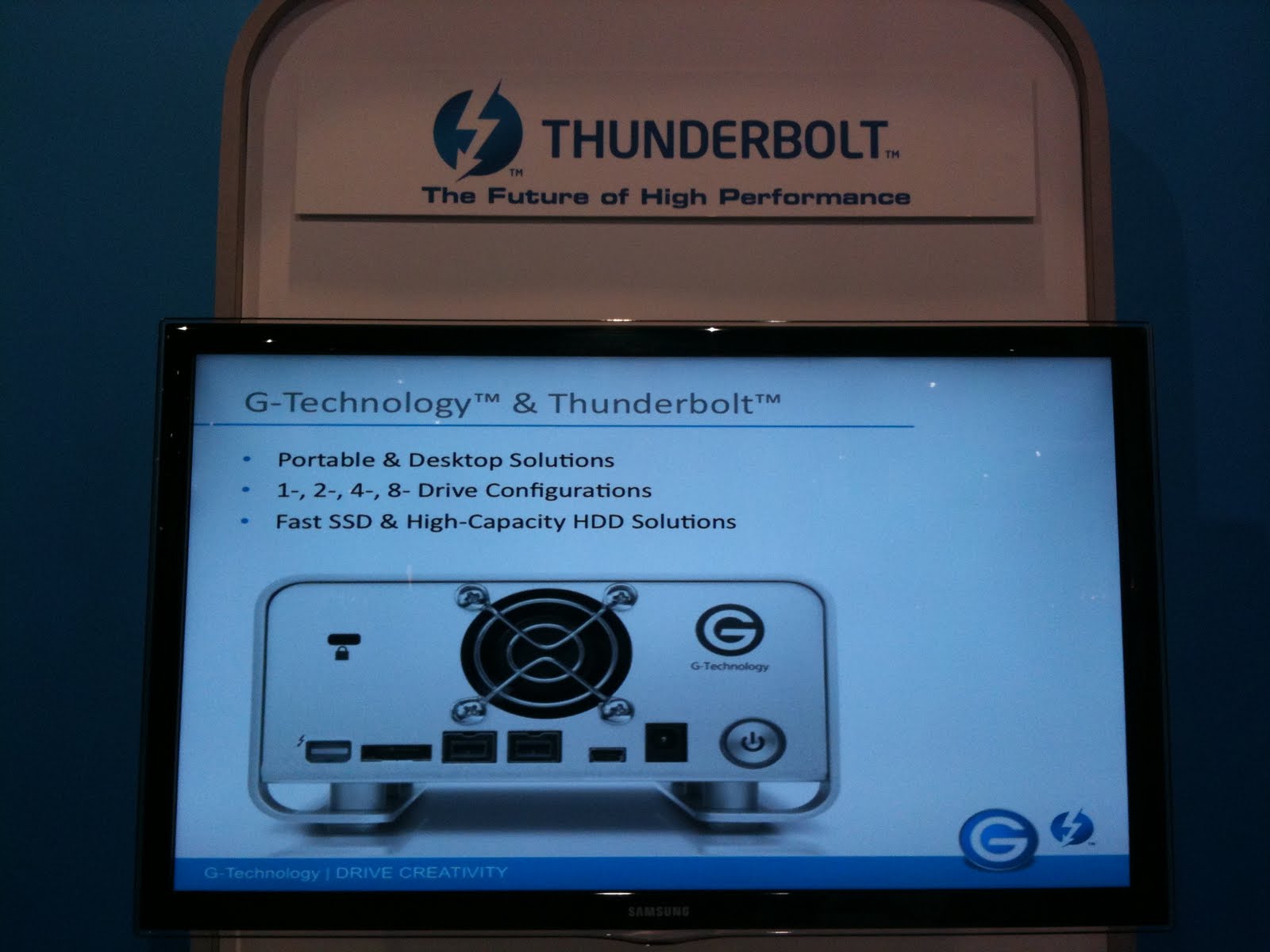
I was glad to see a few companies jumping on the Thunderbolt bandwagon.  Promise Technology has some nice looking four and six drive RAIDs coming out this summer that use a Thunderbolt connection, as does G-Technology.

Image:  Thunderbolt is coming to G-Technology drives
My coworker and I were keeping an eye open for any camera mounted recording devices.  We really liked the AJA Ki Pro and Ki Pro Mini.  SDI and HDMI inputs, balanced audio inputs and records to Apple ProRes ...works for our workflow.  On the higher end of things is the impressive Cinedeck Extreme.  With a nice built-in preview monitor, it will record to ProRes, Avid DNxHD or CineForm.  Too much for what we're looking for, but fun to play with.

Image:  Cinedeck Extreme
Since we work closely with the IT department, who handles storage, encoding and streaming of the lecture video we acquire, we also visited many booths peddling ingest, encoding, shared storage, and streaming services.  Two companies that caught our eye were building4media and Edit Share.

Image:  Edit Share's shared storage solutions
Since we work for a university that has hundreds of classrooms, we also were interested in remote camera control for installed cameras.  We spent a good deal of time at the Telemetrics booth getting a feel for their camera control units and pan/tilt heads that might integrate with our existing Crestron control systems.

Image:  Telemetrics RCP control panel
We spent most of our time in the south hall, where post production and distribution & delivery were housed.  The central hall (video acquisition & production) was also a popular spot to find us.  We really didn't spend much time in the north hall (management & systems), since we really deal with the video acquisition and post end of things.  We ended up making the most of our show floor time, almost closing the place down on Thursday afternoon.

All in all, the exhibit floor was exhausting, but it was great checking out all the new gear and services.  Looking at the increased attendance this year (92,708 people, up 4,600 compared to last year), I would say the video production industry is a pretty healthy one right now.