Monday, August 15, 2011

NASA Juno Tweetup: day 1 - Atlas V Spaceflight Operations Center tour

Read my previous blog entry in the "NASA Juno Tweetup" series: "Day 1 - Launch Complex 17 tour"
Jump back to my first blog entry in the series:  "Preview of my report"

ULA employees showing us a scale model of the Atlas V rocket

After our stop at Launch Complex 17 to see the Delta II Heavy that will launch the GRAIL spacecraft, we hopped in bus 1A to continue on our tour to the Atlas V Spaceflight Operations Center, Launch Complex 41 with the Atlas V rocket that will launch Juno tomorrow, and finally the Vehicle Assembly Building with a little surprise inside.  You'll read about Launch Complex 41 and the VAB in future blog entries, because this entry is all about the Atlas V Spaceflight Operations Center.

United Launch Alliance is the private company that produces and launches the Atlas V, Delta II and Delta IV rockets.  The recently retired space shuttle is the only launch vehicle that NASA owns.  Otherwise, they rely on private companies to produce launch vehicles for NASA missions.  Popular private space companies are SpaceX, Orbital Sciences, and United Launch Alliance.  ULA is co-owned by Lockheed Martin and Boeing, who produce the Atlas and Delta rockets.  You may be thinking the same thing that SpaceX did in 2005, and that's why they filed suit against Boeing and Lockheed Martin, accusing them of violating antitrust laws when they decided to create ULA.  That suit got tossed out and ULA formed in 2006.

I mention all of this, because when we stepped foot in the Atlas V Spaceflight Operations Center, operated by ULA, I started thinking about the private sector's involvement in the future of space exploration.  Now that the space shuttle program has come to an end, the private space companies are all presenting NASA with launch vehicles that will carry astronauts and cargo into space for future missions.  With the perception that the privately owned companies can perform these tasks faster and cheaper than a government run organization, it looks like the future of space flight will involve NASA and the private sector working hand in hand.

When we arrived at the Atlas V Spaceflight Operations Center, I could immediately notice the difference between NASA and the privately owned ULA.  ULA operates the Atlas V Ops Center, so it was ULA employees giving us the tour.  Right off the bat they explained that everyone must stay together, and we could only snap pictures when they said it was OK to do so.  There were always multiple security guards and ULA employees with us, making sure we didn't wander down a hallway that we shouldn't be in.  A couple of times a fellow Tweetup participant cracked a joke, but the ULA employees weren't having any of it.  It was all business there, and I suppose I can see why that was the case.  They had a $1.1 billion spacecraft (Juno) sitting on the tip of their Atlas V rocket that was set to launch the next day.  If anything went wrong with their launch vehicle and Juno was destroyed...well...I wouldn't want to be on the receiving end of that phone call.

Our tour started with the ULA employees showing us a scale model of the Atlas V rocket.  (see the picture at the beginning of this post)  The Atlas V is an important launch vehicle for ULA, since Boeing recently announced that the Atlas V will be their rocket of choice to test their seven seat spacecraft capsule.  Next up on the Atlas V Spaceflight Operations Center tour was the firing room.  Unfortunately, this was one of the areas that we weren't able to take photographs.  Kind of odd, since they show the firing room on NASA TV HD, but I suppose being a private company, ULA doesn't want something confidential to leak out via a tourist's photo.  Here's a photo, courtesy of NASA, showing the firing room:

Atlas V Spaceflight Operations Center firing room (photo courtesy of NASA)

We were up on the second floor, in the glass windows looking down on the control room.  It would be great to witness that room in person on launch day, but the viewing area is reserved for the clients that purchased the Atlas V they're launching, and I don't have $200 million to drop on a rocket.  Someone from our group jokingly asked where the big red "launch" button was, and it turns out there's no such button.  The ULA employee did say that there's an actual button at the launch director's console for aborting the launch.

Atlas V rocket that will launch the Mars Science Laboratory mission with the Curiosity Rover

After checking out the firing room, we went back downstairs and were led into a large hanger that was currently home to the Atlas V rocket that will launch the Mars Science Laboratory mission and Curiosity Rover in November 2011.  Looking at the picture above, you can see the upper stage is missing.  It's actually in the room with us, but it's detached and behind the lower stage that you see.  We weren't allowed to photograph the upper stage, and the ULA employees and security guards made sure we didn't venture around the lower stage for a sneak peek.  I'm sure there was a perfectly acceptable reason for why they didn't want images of the detached upper stage floating around blogs just like this one.  We're talking about multimillion dollar rockets, so I can see why a privately owned company would want to keep some secrets to themselves.

The business end of an Atlas V rocket

It was an amazing feeling standing ten feet away from a rocket that will soon be propelling a spacecraft toward Mars.  The picture above shows the bottom of the lower stage, obviously lacking the solid rocket boosters.  The lower stage sits on a frame of wheels, essentially making it a super expensive tractor trailer.  It's transported down the highway towed behind a truck.  Make sure to give the driver a wave next time you pass an Atlas V on the highway.

The lower stage of the Atlas V was so long, it was hard to get it all in the frame

This hanger was the last stop on our tour of the Atlas V Spaceflight Operations Center.  As we piled into bus 1A, we couldn't help but notice that the bus' front door was now sitting on the rear seats.  No clue how it happend, but while we were touring the Atlas V Spaceflight Operations Center, our bus' door fell off.  Well, who needs a door anyway, right?  Unfortunately, NASA decided that we needed a door, so we had to wait for a replacement bus.  If you know anything about Florida in August, you know that temps tend to run on the high side, and the humidity makes it possible to slice the air with a knife.  Combine those facts with sitting on a crowded bus, on pavement, in the afternoon sun, with no door....well, you get the picture.  Luckily bus 1B showed up to save us, and we were on our way to our next stop:  Launch Complex 41 to see Juno atop its Atlas V.

Read my next blog entry in the "NASA Juno Tweetup" series:  "Day 1 - Launch Complex 41 tour"
See all my pictures from the NASA Juno Tweetup

Friday, August 12, 2011

NASA Juno Tweetup: day 1 - Launch Complex 17 tour

Read my previous blog entry in the "NASA Juno Tweetup" series: "Day 1 - arrival and guest speakers"
Jump back to my first blog entry in the series:  "Preview of my report"

Launch Complex 17 with a Delta II Heavy inside the service structure

After a wonderful morning getting to know my fellow Tweetup participants, and hearing stimulating talks from many of the Juno and launch services team members, it was time for our bus tour of Kennedy Space Center.  This is a portion of the Tweetup that everyone has been very excited about.  This wasn't the KSC tour that you can purchase from the Visitor's Complex.  This was a tour of Kennedy Space Center and Cape Canaveral Air Force Station sites that only employees really get to see.  The tour consisted of visiting Launch Complex 17 to see the Delta II Heavy rocket that will launch the GRAIL spacecraft, the Atlas V Spaceflight Operations Center run by ULA, Launch Complex 41 to see the Atlas V rocket with Juno on top, and finally the Vehicle Assembly Building, which contained a surprise for all of us.  You'll read about the last three sites in subsequent blog posts, because this post is all about Launch Complex 17.

After lunch, we all piled in three buses and headed off in different directions.  I was on bus 1A (I'll explain that in the next blog entry about the Atlas V Spaceflight Operations Center), which started off on our journey to our first stop at Launch Complex 17, which is currently home to a Delta II Heavy rocket that will launch the GRAIL spacecraft to the moon on September 8th, 2011.  I was lucky enough to be sitting near Dave Allen, a fellow Tweetup attendee, who really knew his KSC/Cape Canaveral history.  He was giving the back of the bus a great, impromptu tour as we made our way to LC-17.  On the Air Force Station, we drove by what looked to be one or two of the space shuttle solid rocket boosters.

Dave also made sure to point out the location of Launch Complex 5, which was where Alan Shepard left earth for 15 minutes on a Mercury Redstone rocket in 1961, becoming the first American (second human) in space.  Based on the number of rocket failures the American space program experienced in the early years, I think it's safe to say that Alan Shepard is a daredevil.  They were still unsure of the effects that space would have on a human, and especially unsure if the rocket would even get off the launch pad successfully.  Shepard had plenty of time to think about all of this, while the techs on the ground worked out issues with Alan in the capsule on the launch pad for over four hours.  His frustration with the delays caused him to say one of my favorite phrases to the crew:  "light this candle."

Launch Complex 17 A and B

We finally arrived at our first stop:  Launch Complex 17 on the Cape Canaveral Air Force Station.  This launch complex has been home to the Delta launches since the early 60's.  Currently, pad 17A isn't in use, but 17B is, and was loaded with a Delta II Heavy rocket that you can see inside the support structure.

Launch Complex 17B with a Delta II Heavy rocket inside the support structure

Looking closely, you can see the many solid rocket boosters that surround the bottom of the Delta II Heavy.  This rocket is awaiting delivery of the GRAIL spacecraft that will study the moon's gravitational fields to determine the moon's interior structure.  Actually, the GRAIL spacecraft is really two twin spacecraft that will both orbit the moon together.  FYI:  GRAIL stands for "Gravity Recovery and Interior Laboratory".

When the GRAIL spacecraft is delivered, it will be placed atop the Delta II Heavy right at the launch pad.  The right side of the support structure contains a crane that will lift the spacecraft to the top of the rocket.  When it's launch time, the support structure rolls out of the way to expose the rocket on the pad.  Launch is set for September 8th, 2011.

NASA employee (in black baseball cap) and ULA employee (in blue polo shirt) talking about the GRAIL mission and the Delta II Heavy rocket

While we were at LC-17, we were treated to a quick talk about the GRAIL mission and the Delta family of rockets from a NASA employee and a United Launch Alliance employee.  I really wish I remembered their names, but I didn't write them down.  Very interesting guys that gave us some great info.  ULA is the private contractor (owned by Lockheed Martin and Boeing) hired by NASA to coordinate the launch logistics for the GRAIL mission, and also the Juno mission.  ULA produces the expendable launch vehicles (Delta II, Delta IV and Atlas V rockets) that launch NASA unmanned spacecraft missions.  It was interesting to see how the private companies are now so involved in the space program.

The ULA employee made sure to point out the fact that the Delta II rocket has had a 100% success rate.  I'm not sure exactly what he was referring to, since a Delta II rocket exploded shortly after takeoff from LC-17 in 1997.  I'm guessing he was referring to a different, more modern version of the Delta II that hasn't experienced a failure.  The ULA employee did mention that there are more Delta II rockets built and ready to go, which was a reference to the fact that NASA (and the Air Force) may or may not decide to continue using the Delta II.  When asked about ULA's competitors in the private space flight market, he posed the question:  what would you rather trust to keep your your astronauts and expensive cargo safe, a rocket that has had two test flights (SpaceX) or rockets (from ULA) that have had hundreds of successful launches?  He also stated that all the GPS satellites we use on a daily basis were put into orbit by Delta rockets.  The NASA employee did make a funny statement when someone asked about the condition of the pad right after a launch.  He said it's just like when you throw a BBQ at your house, you come out with the power washer the next day and flush everything away.  He said it's surprisingly cleaner than you think, but still does require a good cleaning.

So far, our KSC and Cape Canaveral Air Force Station tour was off to a great start.  Next stop, the Atlas V Spaceflight Operations Center to see ULA's firing room and to stand 15 feet from the Atlas V rocket that will launch the Mars Science Laboratory mission with the Curiosity Rover in November.

Read my next blog entry in the "NASA Juno Tweetup" series:  "Day 1 - Atlas V Spaceflight Operations Center tour"
See all my pictures from the NASA Juno Tweetup

Wednesday, August 10, 2011

NASA Juno Tweetup: day 1 - arrival and guest speakers

Read my previous blog entry in the "NASA Juno Tweetup" series: "Preparation and travel"
Jump back to my first blog entry in the series:  "Preview of my report"


The first day of the NASA Juno Tweetup had finally arrived.  After a few wrong turns, and finding myself at a Kennedy Space Center security checkpoint without a badge, I found my way to the Press Accreditation Building to get my Tweetup badge.  I was also given a bag of NASA goodies that included a space station calendar, mission pins and patch, stickers, and plenty of reading material about Juno and the NASA Launch Services Program.

NASA goodies

Now that I could actually get through the security checkpoint, I was directed to park next to the Vehicle Assembly Building.  The Tweetup tent (our home for the next two days) was located at the Launch Complex 39 Press Site.  I immediately decided that I had to take my picture with the Vehicle Assembly Building.  You know how Neil Armstrong immediately grabbed some samples of moon rocks before he did anything else, so in case anything happened he would at least have the samples to bring back?  Well, I felt the same way about getting my picture with the VAB.


After I stepped foot on the LC-39 Press Site, I started thinking about the history that people witnessed standing on the same ground I was standing on.  The excitement of the first Saturn V rocket shaking the ground as it left the launch pad.  Three men leaving earth on the tip of a Saturn V, not sure if they'll return from walking on the moon.  The horror of watching STS-51-L Challenger, the first shuttle to launch from LC-39B, break apart only 73 seconds after launch.  Less than one month earlier, on July 8th, 2011, those standing at the LC-39 Press Site witnessed the final launch of a space shuttle.

Here's a quick video tour of the LC-39 Press Site that I created.  I shot this video on day 2 (launch day):


NASA provided us with a large, air conditioned tent, equipped with a stage for the guest speakers and Wi-Fi for all of us nerds to use.  After all, you can't expect us to yack about the event on social media sites without decent network connections.  Adrenaline and excitement levels were at an all time high, but the NASA Tweetup organizers somehow quieted down 150 pumped up nerds so we could go around the tent and introduce ourselves.  Talk about a diverse and interesting crowd!  I was pretty excited to connect with many of my fellow Tweetup participants and keep in touch after our two days together were over.  

Tweetup participants connecting to the tent's Wi-Fi

After introductions, Trent Perrotto and Stephanie Schierholz got the speaking portion of our day started.  This event was televised by NASA TV on their Education Channel.  Even though I was at a NASA event, I'm still a video production nerd, so of course I checked out their equipment.

NASA TV's Panasonic HPX2000 cameras with a Telecast fiber system

The Tweetup organizers really put together a wonderful group of guest speakers for us.  We had a great mix of those who work on the Juno team and the Atlas V launch team.  Here's the list of speakers we heard from:


I'm really drawn to the engineering aspect of space exploration, so I was concerned that the scientific talks would be over my head.  Either I comprehend more than I think, the speakers dumbed it down for us, or it was a combination of both, but I really enjoyed the talks about the scientific aspects of the Juno mission.  Looking back at my Tweets during the talks, I had a few that stood out to me:
"@NASAJim tells us that it will take 48 minutes for data signals to get from back to Earth when it's orbiting Jupiter"
"Jupiter's winds are so strong they change the shape and magnetic fields of the planet. The "eye" must be one heck of a storm!"
" will eventually (5 years from now) make 33 orbits of Jupiter. The orbits will get as close as "skimming the clouds"
"The equipment on is protected from Jupiter's super high radiation levels by a 1/2" thick casing of titanium."
"Chris Brosious, from Lockheed Martin, says dust and small particles in space will destroy 5-10% of solar cells."
The thought that really came to my mind during the talks is something that I also Tweeted that day:
"All the speakers they have for us are the kind of lucky people that get paid to do what they absolutely love to do."
These were some really amazing people that were utterly enthusiastic about sharing their knowledge with us.  I found it very motivating to be around so many people that had such deep passion for what they did.  I also couldn't overlook the fact that they are all geniuses!  If someone came to me and said that I had to design a spacecraft that can study a planet that's 365 million miles away, I wouldn't have the first clue where to start!  Well, don't take my word for it.  Here's the complete video from the NASA TV shoot that day:


After the speaking portion of the day wrapped up, we walked over to the NASA employee cafeteria for lunch.  The food was nothing to write home about, but it was still neat to be eating in the shadow of the Vehicle Assembly Building.

If you haven't figured it out from this blog post, the morning of day one was a blast.  Stimulating guest speakers really built up the excitement level for the launch of Juno, and the tent was buzzing with anticipation for our Kennedy Space Center tour that afternoon.

Read my next blog entry in the "NASA Juno Tweetup" series:  "Day 1 - Launch Complex 17 tour"
See all my pictures from the NASA Juno Tweetup

Monday, August 8, 2011

NASA Juno Tweetup: preparation and travel

Read my previous (and first) blog entry in the "NASA Juno Tweetup" series:  "Preview of my report"

Juno spacecraft

Ever since the space shuttle launches were happening, I had applied to be a part of the NASA Tweetups.  Spending a couple of days at Kennedy Space Center hearing talks from those involved in the shuttle program, getting a tour of KSC, and watching the launch from the famous Launch Complex 39 press site sounded like a great time.  Unfortunately, I never got picked for any of those Tweetups.  Not even the waiting list.  When NASA decided to hold a Tweetup for the unmanned launch of the Juno spacecraft, my luck turned around.  I applied for the Tweetup fully expecting to not get into this one, but I received an email response stating that I made it to the waiting list.  One week later, my luck really turned around and I received another email saying that I was confirmed for the Tweetup.

Warning: this blog entry might be a bit boring with lots of really specific details, but I figured it will help future NASA Tweetup attendees.  The next few blog entries in my "NASA Juno Tweetup" series will get into the exciting details about my two days at KSC, so stick with me!

I kept up with the Twitter feeds of those who attended the previous shuttle Tweetups, so I knew that even though this wasn't a shuttle launch, it would still be an amazing experience.  Some of the confirmed participants created a Google Group, as well as a Wiki page, and started exchanging messages about travel and lodging plans.  Many of the participants are local to central/east coast of Florida, so they weren't concerned with finding a place to stay.  Those of us that had to travel started looking for hotel recommendations, and some even threw out the idea of getting together and renting some houses together for the week.  This was something that previous shuttle Tweetup attendees started doing.  Unfortunately, due to the fact that I couldn't commit to the Tweetup until about a week or two before it, I wasn't able to participate in one of the shared houses.  It sounds like they really had a blast staying together, but I didn't want to have to dump out at the last minute and leave the other renters high and dry.  I ended up renting a room for three nights at the Hampton Inn in Titusville.  The Hampton Inn, Holiday Inn and Fairfield Inn, all next to each other in Titusville, were all very similar and convenient to KSC.  These three hotels were very popular for Tweetup attendees. 

After I booked my hotel, rental car and airplane ticket (I flew into Orlando), I started thinking about what I would have to bring.  Shannon Moore has a great blog entry with a list of items that she (and others) recommend.  Since I'm an audio visual technician, I was toying with the idea of borrowing a nice video camera from work.  Our Panasonic HVX200 came to mind, but I decided against it since I didn't want to be loaded with an extra camera bag, in addition to my backpack with all my other gear.  I decided to just bring some smaller electronic gear, which turned out to be a great decision.  It kept me light and still gave me all the media support I needed.  Here's a list of the electronics/accessories I brought with me:
  • Laptop with Wi-Fi capability
  • Canon HF20 video camera
  • Canon PowerShot SD1000 digital still camera
  • iPhone
  • monopod
  • extra memory cards and batteries for the cameras
  • all necessary USB cables and power supplies for laptop and cameras
  • USB drives to backup files

Toby helping me pack my backpack of electronics

As for non-electronics that I also packed, these are the items that I found to be essential during my two days of Tweetup:

It was August in Florida, so anything that you can wear and do to keep cool is essential.  The temps were in the mid-nineties and the humidity was crippling.  We were required to wear long pants on our KSC tour, but having the zip off pants allowed me to wear shorts the rest of the day.  The tent that we were set up in was air conditioned, but the AC units just couldn't handle the afternoon sun beating down.  We were sweaty and disgusting by the end of the day, but everyone was in the same boat.

But I'm getting ahead of myself.  The day finally arrived for my travel down to Florida.  I flew out on a Wednesday evening after work, so I was very antsy at work all day.  The Twitter hashtag "#NASATweetup" was starting to get some good action from other participants that were either already there, or were also traveling that same day.  I was really starting to get excited.  My flight from Boston to Orlando was uneventful, as was my 45 minute drive from Orlando to Titusville.  I was like a kid trying to fall asleep on Christmas Eve, but I was finally able to get a little sleep before the first day of the Tweetup.

Sunset from 30,000 feet flying from Boston to Orlando

All in all, the hotel, airfare and car rental wasn't cheap, but totally worth it for the experience.  Years from now I won't remember the money I spent, but I will remember the NASA Tweetup experience for the rest of my life.  Stay tuned to my blog, as I'll be posting more entries detailing my two exciting days at the NASA Juno Tweetup.

Photo courtesy of Ranz Adams

Read my next blog entry in the "NASA Juno Tweetup" series:  "Day 1 - arrival and guest speakers"
See all my pictures from the NASA Juno Tweetup

Monday, August 1, 2011

NASA Juno Tweetup: preview of my report

Juno spacecraft

Even though this blog typically focuses on video production and other tech related subjects, next week I'll post a report that relates to another one of my interests: space exploration.  On Thursday and Friday (8/4 and 8/5), I'll be attending a Tweetup at the Kennedy Space Center for the launch of the unmanned spacecraft, Juno.  It'll launch atop an Atlas V rocket leaving Cape Canaveral, and Juno will travel for five years to Jupiter.  When it reaches Jupiter, it will orbit the planet for one year, studying the atmosphere and mapping the planet's surface, then will end its life by deorbiting into Jupiter.

Atlas V rocket that will launch Juno

If you're not familiar with a Tweetup, it's a marketing tactic where an organization, like NASA, gathers enthusiastic Twitter users in hopes that we will drum up online interest in NASA and the Juno program.  NASA will give us a behind the scenes tour of the Kennedy Space Center, a chance to talk to the scientists and engineers that created the Juno spacecraft, then we get to watch the Atlas V launch from the media site with the famous countdown clock.

NASA countdown clock at the KSC media site

The first launch window is on Friday, 8/5, at 11:34am EDT, with another launch window open exactly 24 hours later.  Let's hope for good weather so I can witness my first launch.  Tune into NASA TV to watch the launch, then keep an eye on this blog for my report and pictures from the Tweetup.

Read my next blog entry in the "NASA Juno Tweetup" series:  "Preparation and travel"
See all my pictures from the NASA Juno Tweetup

Thursday, July 28, 2011

Campus Technology Conference 2011


On July 26th, a couple of my coworkers and I ventured down to the Campus Technology Conference, held at Boston's Seaport World Trade Center.  My job entails working with video, but the majority of my time is spent using projection and audio systems, as well as room control systems.  This is the first year I was able to attend the Campus Technology Conference, which is shocking when you consider the fact that it's only a 30 minute subway ride from my office.  We only attended the show floor (thanks to Crestron for the free tickets) since we didn't have the time or budget to commit to a few days of breakout sessions/classes.  Many of the breakout sessions looked interesting, but the majority of them were really geared toward academic IT departments, and not really academic AV support departments.  Since we didn't attend the InfoComm show this year in Orlando, I was interested in seeing some of the new products that were announced at that show.

The first booth we visited was ShareStream, which is a company started by a Harvard alum, David Weinstein.  David was in the booth, so the four of us had a nice conversation about the services they provide.  To use their words, ShareStream is "a turnkey system for creating, editing, storing, managing, and delivering rich media."  In short, it's used to deliver lecture video to students.  We work closely with our IT department for storing and delivering lecture video, so this is an area that we're interested in.  We're mainly responsible for the acquisition and editing of lecture and event video on campus, then the IT folks store and deliver it via streaming servers.  There's more to it, but that's a simplified version of our workflow.  So naturally ShareStream provides services that we were interested in hearing about.

We wandered in and out of various booths, but our next big stop was a visit with our friends at the Crestron booth.  We use many Crestron room control products on campus, so we're familiar with most of their offerings.  We were especially interested in discussing the new products they announced at the InfoComm Show in June.  The Crestron rep was pretty excited to tell us about their new Capture-HD system, which is used to capture and encode lecture video.  There are quite a few lecture capture systems on the market these days, so it will be interesting to get our hands on a demo unit and try Crestron's solution.  Crestron is making a big push for its DigitalMedia system that, in a nutshell, delivers video and audio signals around a room to multiple displays via CAT5 cable with Crestron switchers and signal processing equipment.  They're more than just room control systems these days.


Our next stop was at the Kaltura booth.  Kaltura is an online video platform that allows users to manager their online video content.  It's very flexible (open source) and seems to have a great staff working behind the scenes in support.  We had a nice conversation with one of the reps.


Wandering down the show floor aisle we came across another one of our good friends, Extron.  In addition to Crestron control systems on campus, we have many, many rooms using Extron control systems.  The first item I noticed in the Extron booth was a H.264 encoder that they introduced at InfoComm.  It has multiple inputs and seems like a simple solution for H.264 encoding.  We spent the rest of our time talking to the Extron reps about the new DVS 605 switcher.  This is a new seamless switching scaler that they introduced at InfoComm.  The key is that the switcher is DHCP compliant.  The exchange of DHCP keys between video sources, switchers/other processors in the signal flow, and ultimately the display can really slow down switching between sources.  When we're switching sources in a presentation setting, it needs to be seamless and fast, otherwise it looks very clunky and unprofessional.  It'll be very nice to get our hands on a demo unit of the DVS 605.


Next up was a presentation by the Wowza Media Systems CEO, David Stubenvoll.  David's talk was about implementing video stream, but of course he peppered it with information about the Wowza Media Server.  Wowza can take H.264 content and deliver it to almost any device that can playback video, in many different formats.  Flash, Silverlight, Apple HTTP, etc.  Davis really knows his stuff about viodeo streaming, and Wowza looks like a great product.  We later visited the Wowza booth, and this seems like another company that has a great support staff standing behind the product.

WolfVision VZ-9plus document camera

We visited many booths as we made our way down the aisles, but our last big stop was the WolfVision booth.  As far as document cameras go, WolfVision makes some exceptional products.  If you're not familiar with document cameras, think about the old overhead projectors, just with a camera pointing down at the material, and a VGA or DVI output that can be connected to a projector.  We have a few of their VZ-9plus document cameras already on campus, and I also use their EYE-12 camera to project live science demonstrations in the classroom on the projector.  WolfVision makes great products.  It's amazing how detailed the image is when you have the high res camera zoomed in all the way.  You can see details on a dollar bill that you can't see with the naked eye.  Great for the art department or some of our professors that use rare books in their teaching.

Even though the Campus Technology Conference is much smaller than the InfoComm show or NAB, they still offered a nice mix of exhibitors.  I can't speak to the quality of the breakout sessions/classes, since we didn't take any.  Maybe next year we'll have the time and budget to give them a try.

Friday, July 22, 2011

Boston Final Cut Pro User Group meeting recap: 7/21/11

The EP Levine store and location of this month's BOSFCPUG meeting

Last night's Boston Final Cut Pro User Group meeting was an enjoyable evening of guest speakers, product demos, and on a 95 degree day, robust air conditioning.  The event was held at EP Levine in Waltham.  EP Levine is a camera store with many goodies for still photographers and those that shoot video with DSLRs.  The also have a nice studio space, where the BOSFCPUG event was held.  My coworkers, Kevin and Geoff, enjoyed digging through the cases of used lenses.  Geoff couldn't pull the trigger on a tilt shift lens he was eyeing, but Kevin ended up making a purchase.  As he mentioned, EP Levine's prices were comparable to what he found online for the same lens, and he has the piece of mind of buying from a local retailer.

One piece of news jumped out at me:  Daniel Berube mentioned that the Boston SuperMeet is tentatively scheduled for October 20th, but the date may change to accommodate the schedule of a "special guest."  Who could it be?  Maybe Larry Jordan, or Kevin Smith (who was bumped from the Vegas SuperMeet), or maybe Apple executives begging us to stick with FCP X.  We shall see.  Last year's Boston SuperMeet was a very fun evening, as was this year's SuperMeet at NAB.

As usual, Daniel Berube worked very hard to put together another action packed evening for all of us.  The evening's speakers started with Jay Ignaszewski from AJA, then Charles Roberts from Fitchburg State University, followed by Gary Oberbrunner from GenArts, and Steve Martin wrapped up the speaking portion of the event.  The evening ended with a screening of DSLR shorts, and a raffle.  Unfortunately, my coworkers and I needed to duck out after Steve Martin's talk, so I have no details about the screening or raffle for you. 

Jay Ignaszewski started the evening with information about AJA's products interacting with Final Cut Pro X.  There was a good deal of concern from the other BOSFCPUG members about external monitoring and exporting out to tape.  This AJA document does a much better job than I can do of summing up what Jay talked about.

The next speaker was Charles Roberts, a faculty member at Fitchburg State University that teaches video production.  I found Charles to be a very engaging speaker, with lots of enthusiasm for teaching.  One comment that stuck with me is something that he stresses to his students:  don't lose out on jobs because you only know one piece of NLE software, or because you're fiercely loyal to using only one NLE.  Expand your knowledge so you're ready to step into any job and use any piece of video production software that they throw at you.  As he said, there's many ways to get the same job done, and most times you don't get to choose what tools you have to use.  The meat of Charles' talk focused on using FCP 7 to inject DSLR footage, send it to Avid Media Composer for edit, send it to Apple Color (with the help of an EDL) for grading, then complete the roundtrip back into FCP 7 for final export.  I personally couldn't imagine me having the need to do this, but it was interesting to see the process.  All in all, I hope to hear more from Charles at future BOSFCPUG meetings.

Next up was Gary Oberbrunner from GenArts demoing their Sapphire Edge effects package.  GenArts is located right down the road from me in Cambridge, MA.  They make some very impressive effects packages used by major film and video productions.  Gary focused on the Sapphire Edge plug-in package, which, as he described, is 15 transitions and 4 filters.  Even though that seems kind of limited, each transition and filter has numerous presets and settings that can be changed, giving you hundreds of pre-built looks.  I was very impressed with the effects Gary showed us.  Gary focused on using these Sapphire Edge plug-ins in FCP 7, because, as he showed us, they're still working out the kinks of integrating these plug-ins into FCP X.  He showed us how FCP X unexpectedly quits when some of the plug-ins are used, so it's still very much in the beta testing stage.  The Sapphire Edge package is $299 and includes a one year subscription to their FX Central website.

A crummy cell phone pic of Steve Martin presenting to all of us
The final speaker of the evening was the keynote speaker, Steve Martin.  Steve is an Apple Certified trainer, founder of Ripple Training, and was one of the first to get their hands on FCP X.  In addition to speaking this evening, he is also teaching an eight hour FCP X workshop on 7/22.  Sorry to say, if you're reading this recap, it's too late...you missed it.  Since my employer doesn't have plans to switch to FCP X anytime soon, I opted to not attend the workshop.  Steve is an excellent trainer, so I'm sure that those attending the workshop are finding it valuable.  I was first introduced to Steve when I took Post Production World classes at the NAB Show this year.  I didn't take a full course from Steve, but he did pop into a couple of the classes I took to contribute.  He really knows his stuff and knows how to teach it, so if you have the chance to catch a talk or class from Steve, don't miss it.  I would love to see him back at a BOSFCPUG meeting very soon.

Steve's talk focused on common myths surrounding FCP X, but really just turned into a very helpful collection of tips and tricks to get us acclimated to the new interface and features.  Since I have yet to install and use FCP X, this was a nice way for me to get motivated to start using it.  I'll summarize some of the key points that stood out to me, but keep your eye on the BOSFCPUG webpage, since Daniel arranged to have Steve's entire talk recorded.  I'm sure they're editing the video and will post it ASAP.
  • FCP X and DSLR footage:  Steve showed us the process of transcoding DSLR footage to ProRes in the background as you work.  The "create optimized media" check box in the import window is your friend, if this is what you're looking to do.
  • Turn a stereo audio clip into two mono tracks:  control click on the stereo audio track and select "break apart clip items" to split into two mono tracks
  • Steve showed us FCP X's ability to edit sub frame audio
  • As goofy as the labeling is, Steve's demo of the "Ken Burns" button looks like a painless way to pan and zoom still images.  Just a more user friendly method than doing it with keyframes.
  • Steve showed us that when you paste effects in FCP X ("paste attributes" in FCP 7), you can't pick and choose which effects/attributes you do and don't want to paste.  That was a nice feature of older FCP versions that has been eliminated from FCP X.  You now just have to paste all the copied effects and turn off those you don't want in the inspector window.
  • During the Q&A portion of the evening, someone asked Steve about preserving Photoshop layers when you import into FCP X.  Unfortunately, the answer is that it won't do it.   You can do it in Motion, just not directly in FCP X.
  • Someone asked Steve about FCP X's multicam editing support, and he confirmed that even though it doesn't currently have that feature, it's something that Apple will integrate into a future update.  No word on when, though.  This is one of many reasons why we can't currently use FCP X for our projects.
  • Steve ended his talk by presenting the idea of using the AirDisplay app on your iPad to wirelessly create a second monitor with your iPad.  He said that there's a very slight, but hardly noticeable bit of lag on the iPad.
Since Steve's livelihood relies on people wanting to be trained on Apple software, he made sure to throw a few "don't give up on Final Cut" promos in his talk.  I don't think anyone denies the fact that FCP X has a bunch of great new or redesigned features.  It's just lacking features in some really key areas, and video professionals can't wait around for future updates to address those issues.  With Avid and Adobe offering discounts on Media Composer and Premiere, it'll be very interesting to see how all of this plays out.

As I mentioned, we weren't able to stick around for the screening and raffle at the end of the evening.  All in all, it was another informative and motivating BOSFCPUG meeting.  As usual, I look forward to next month's meeting!

Wednesday, June 15, 2011

Boston Final Cut Pro User Group meeting recap: 6/14/11

View of Boston harbor from this month's BOSFCPUG meeting on the 33rd floor

Another Boston Final Cut Pro User Group meeting is in the books, and as usual, it was an enjoyable evening.  This month's meeting took place at the University of Massachusetts Club in Boston's financial district.  I think Daniel Berube had to schedule this month's meeting a week early since he'll be in the U.K. next week for the London SuperMeet.  Unfortunately, there wasn't any news about a Final Cut Pro X release, since there wasn't an announcement made at Apple's June 6th WWDC.  This month's meeting featured Ken LaRue discussing Autodesk Smoke for Mac 2012, the always entertaining Bob Russo talking about Avid's Media Composer 5.5, and Jay Ignaszewski talking about AJA's tapeless workflow solutions.  As usual, the evening concluded with the Big Dig Raffle, which featured an AJA KiPro Mini.

I was especially interested in Bob's Media Composer presentation, since I use Premiere and Final Cut, and haven't had much exposure to Media Composer.  I was also looking forward to hearing from Jay, since I enjoy keeping up with tapeless workflow solutions.

Ken LaRue talking Autodesk Smoke

Ken LaRue started off the evening with an Autodesk Smoke demo.  Ken is a great speaker, and ran a very nice demo.  I have never used this program before, but this is the second demo I've seen of it.  Ken kept pushing the fact that we all use multiple programs to get the job done (Final Cut, Photoshop, After Effects, etc.) and Smoke combines the power of those programs into one package.  Smoke really provides some powerful tools for editing, motion graphics, 3D effects, titling, keying, color correction, motion tracking and Photoshop type painting tools.  Here are some of the highlights from Ken's demo, along with some opinions from me:
  • At first glance, the Smoke GUI is very cluttered and utilitarian.  Ken stressed that as you use the program, you start to get more comfortable with the layout.  Looking at it for the first time, you just see a screen cluttered with many buttons in no apparent logical order.  Ken was using what looked to be a Wacom tablet and pen to navigate.
  • Smoke offers very impressive tracking tools.  Ken showed us some tracking demos, and Smoke handled multiple tracking points very quickly.
  • There's lots of rendering to be done after you apply all of Smoke's various tools.  Ken rendered everything, rather than show it in real time unrendered playback.  He was using a nice Mac Pro with a powerful Nvidia graphics card (I forget what model he mentioned), so the renders were pretty fast.
  • Obviously, Smoke integrates well with other Autodesk programs like 3D Studio Max and Maya.  Ken was importing 3D objects created in 3D Studio Max and had the ability to manipulate them in Smoke.
  • Smoke has node based aspects to it as you start to apply the available tools, so that node window can get very cluttered and hard to read.  Ken flew around the node window very quickly, so I'm sure it's something that comes with using the program.
  • The retail price for Smoke is $15,000, so their target market isn't the low end video production pro.  Their demo video featured many high end post production houses using Smoke for feature films and national commercials. 

Bob Russo discussing Avid Media Composer 5.5

The next speaker was Bob Russo talking about Avid Media Composer 5.5.  The last time I heard Bob speak was at the November 2010 BOSFCPUG meeting at WGBH.  I have never used any of Avid's products, so I was interested in getting an introduction to MC 5.5.  Here are some highlights from Bob's talk, along with my opinions.  Remember, I'm new to MC 5.5, so you might think "duh, they've had that for years" to some of my observations:
  • MC 5.5 now supports the AJA IO Express to capture footage.  To end a debate I had with a couple coworkers over a few beers one night, Bob pronounced it "A.J.A." (the letters), not "Ahh-Jaa" (phonetically).
  • Bob started with a demo of combining multiple formats and varying frame rates on the same timeline.
  • Bob continued on to show us a multicam edit.  The process and interface looked very similar to multicam edits in Final Cut and Premiere.
  • ScriptSync is Avid's tool for linking your media to a text file containing your script.  Bob had footage shot for a very cheesy small budget film, along with the script.  ScriptSync was able to process the text in the script and sync it with the same text spoken in the footage.
  • Bob's next demo showed us how to manipulate clips in the timeline using the tools we're familiar with in FCP and Premiere:  ripple, roll, etc.  Bob also showed us that it's easy to simply click on a transition in the timeline to adjust duration.
  • Bob threw in a little sales pitch for some control surfaces that will integrate well with MC 5.5Avid purchased Euphonix a year ago, so those were the control surfaces featured.
  • PhraseFind is a feature in MC 5.5 that will scan the audio in your media and catalog it to make a searchable database.  It phonetically catalogs the dialogue, so Bob mentioned that you also need to think and type phonetically when you're searching.  I imagine it has the same issues as text to speech conversion, but just in reverse.


(L to R) Bob, Ken and Jay Ignaszewski from AJA

The last speaker of the evening was Jay Ignaszewski from AJA.  Here are the highlights from Jay's presentation:
  • Talking about the Ki Pro, Jay said "right now it's just ProRes".  Does that mean that AJA is working on offering multiple codecs, like the Cinedeck Extreme that can record to ProRes, Avid's DNxHD and Cineform?  Or it means nothing and I'm digging too much into his comment.
  • Only a few compact flash card manufacturers are approved by AJA for use in the Ki Pro Mini.  Obviously they've had issues with cheap cards not being able to keep up with the bandwidth required to capture ProRes 422 HQ (which is 220 Mbps).
  • It's easiest to connect the Ki Pro Mini to a laptop via ethernet and make settings adjustments with the software interface.  The screen on the unit looks pretty small.

As is customary at BOSFCPUG meetings, the evening concluded with the Big Dig Raffle.  Daniel had the usual assortment of Focal Press books, FCP plug-in packages, Adobe Production Premium CS5.5, and an AJA Ki Pro Mini.  I've been unlucky for the past few BOSFCPUG raffles, as well as the huge raffle at the NAB Vegas SuperMeet, but tonight my luck turned around.  I won this little beauty:

Big Dig Raffle prize winner!
Now, I fully appreciate the fact that I was a winner this time, but even Daniel essentially admitted that this was a re-gifter.  I haven't tried it out yet, but I can't imagine this is a rig that Zucuto will be selling anytime soon.  I especially like how it has no brand name.  This generic baby is straight out of a Lillian Vernon catalog!  The best part is the creepy mustache that the model on the box is sporting:

Creepy
I was thinking of asking the winner of the Ki Pro Mini to trade with me, but he left before I could hunt him down.

Next month's Boston Final Cut Pro User Group meeting will focus on the newly released (hopefully on Tuesday) FCP X and will feature Steve Martin (the FCP trainer, not the comedian).  Steve is a great trainer and I look forward to seeing him.  My coworker, Kevin McGowan, took a couple Post Production World classes taught by Steve this year at NAB and really enjoyed them.

I'm a big fan of the BOSFCPUG, so if you live in the Boston area, keep an eye on their website for news about the July meeting.  I hope to see you there!

Tuesday, June 7, 2011

Mediasonic ProRAID HFR2-SU3S2 review


I recently decided to move my four 1TB drive RAID5 setup out of my computer case and into an external enclosure.  I use this RAID to store all the media for the current project I'm working on, while OS and programs are stored on a separate hard drive.  I previously had the 4x1TB RAID5 in my computer case connected to my Gigabyte GA-X58A-UD3R motherboard's Intel ICH10R SATA controller, which has 3.0Gbps SATA connectors.  I know that everyone recommends an external RAID controller for best performance, but cost was a factor.  I was getting decent enough read and write speeds for the work I was doing, and I never had a problem with the controller dropping the RAID configuration, so I stuck with the motherboard's controller.  I typically work with AVCHD 1080i60 (recorded by my Canon HF20 at 24mbps) and DVCPRO 720p60 footage (recorded on P2 media at 100mbps), and I was getting enough transfer speed to comfortably edit multicam timelines.

I now have a need to add another free standing hard drive to my system, so to free up room inside my case, I decided to get the four RAIDed drives out of there and into an external case.  It was really tight with all those drives in my computer's case.  This will also reduce case temps, increase airflow inside the case, and reduce power draw.  Again, cost was a major consideration, so I had to focus on the cheaper external RAID enclosure options.  I landed on Mediasonic's ProRAID HFR2-SU3S2, which was on sale for $129 at Newegg.

My first impression of the ProRAID is that it has a very solid feel to it.  The unit holds four hard drives and has a built in RAID controller supporting 0/1/3/5/10 RAID levels.  RAID levels are changed with a front panel button.  The case is made of aluminum and the power connector is on the side of the unit, rather than the back, which is awkward.  This unit has a built in, very quiet fan which you can set to three different speeds, or just leave it on an "auto" setting.  The unit will also power up and down automatically as you start and shutdown your computer.

I had a very hard time configuring the ProRAID.  Upon first power up I got an error LED on front panel and the RAID would not be recognized by Windows 7 Disk Management tool.  I followed the manual's description of how to set it up using a RAID5 configuration, but the error LED remained on.  I tried connecting it via eSATA and USB 3.0, but kept getting the same error LED.  I tried a RAID0 configuration, and that worked, so there was hope that this thing wasn't a brick right out of the box.  I switched back to RAID5 and the error LED was back, so I pulled out the drives, reseated them and mixed up their order in the case.  Tried restarting and still got the error message.  Randomly, after another restart, it was recognized by Windows and I never saw the error LED pop on again.

Now I was seeing a new issue:  Windows Disk Management was showing an incorrect drive size.  It was telling me that four 1TB drives in a RAID5 configuration was only 784GB.  Obviously very wrong.  The Intel software that shows the status of the Intel SATA controller on the motherboard was showing the correct usable size for a 4x1TB RAID5 config:  2.8TB.  Windows Disk Management wouldn't allow me to format the RAID to any size larger than 784GB.  I tried a full restart of my computer, and now the MediaSonic ProRAID was only recognizing three of the four hard drives in the RAID, but now it was showing a total size of 1.8TB, which is correct for a 3x1TB drive RAID5 config.  Getting closer, but still not there.  I did another pull of all the drives and reseated them.  Now I tried connecting the ProRAID to another SATA controller on my motherboard (the JMicron JMB362 chip), since I had been connecting via eSATA to my motherboard's Intel ICH10R SATA controller up to this point.  Connected to the JMicron eSATA chip, all of a sudden the ProRAID is finally recognizing all four hard drives and Disk Management is showing the correct size of 2.8TB.  I initialized and formatted the RAID drives with ease.  If you're reading this because you've purchased this device, make sure you use a partition style of GPT (GUID Partition Table) and a file system of NTFS.  Also make sure to right click on the RAID in Device Manager, click on "properties", choose the "policies" tab and check the box next to "enable write caching on the device", otherwise you'll have abysmal write times.  Not sure why this isn't checked by default when you format the drive, but it wasn't for me.  I powered down the ProRAID, connected again to the eSATA port connected to the Intel SATA controller, and all is well.

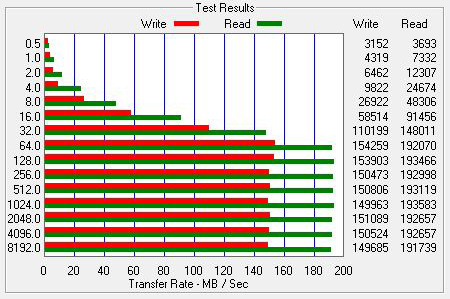
Now that I got this sucker finally up and running, it's time to do some read and write speed tests.  I used ATTO Disk Benchmark v.2.47.  I'll post the ATTO tests results here for you to check out.  All of these tests were done on completely empty, 7200 RPM drives.

ATTO speed test results:  4x1TB RAID5 residing inside my computer case and controlled by my motherboard's Intel ICH10R SATA controller

The image above is my control, showing write and read speed test results when I still had my 4x1TB RAID5 housed inside my computer case and it was being controlled by my motherboard's Intel ICH10R SATA controller.  The numbers on the left represent different size files (in KB) that ATTO transfers to measure write and read times.  As you can see, pretty nice read times for a motherboard's SATA controller.

ATTO speed test results:  4x1TB RAID5 controlled by Mediasonic ProRAID HFR2-SU3S2 internal RAID controller and connected to an eSATA port controlled by my motherboard's Intel ICH10R SATA controller

The image above shows the speed test results for the ProRAID connected to my comp via eSATA.  The same four 1TB drives that were in my computer were moved to the ProRAID.  I'm even connecting the ProRAID to my comp via an eSATA port that is connected to and controlled by the Intel ICH10R SATA controller on my motherboard.  That's the same SATA controller that these four drives were connected to when they resided inside my computer case.  The only difference here is that the RAID5 is being controlled by the Mediasonic's ProRAID internal RAID controller, rather than the Intel ICH10R's RAID controller.  As you can see, much better write times with the ProRAID (which I read is a limitation on the Intel ICH10R chip), but the read times suffer and seem to cap out at 250MBps.  When editing video, read times are very important, so I'm disappointed to see those drop.  Still plenty of speed for the kind of video I edit, but more is always better.

ATTO speed test results:  4x1TB RAID5 controlled by Mediasonic ProRAID HFR2-SU3S2 internal RAID controller and connected to a USB 3.0 port on my motherboard

The image above is a speed test connecting the ProRAID to my computer via a USB 3.0 connection.  Both the ProRAID and my motherboard support USB 3.0, so I decided to give it a try.  As you can see, I get slower write and read speeds than when I had the ProRAID connected via eSATA.  USB 3.0 is supposed to have faster speeds than eSATA (5.0Gbps vs 3.0Gbps) but as you can see from my speed tests, I get better transfer speeds with the ProRAID using an eSATA connection.  Theoretically I should be getting the same transfer speeds using eSATA and USB 3.0, since I'm not bumping up against the max bandwidth for either interface, so the only explanation here is that my Intel ICH10R SATA controller is simply more effecient than my motherboard's USB 3.0 controller.  Gigabyte describes my motherboard's USB 3.0 chip as a "NEC chip", so I'm not sure what the specific model number is.  I will also say that I haven't fished around for any new driver updates for the USB 3.0 chip, so that might improve speeds slightly.

ATTO speed test results:  4x1TB RAID5 controlled by Mediasonic ProRAID HFR2-SU3S2 internal RAID controller and connected to an eSATA port controlled by my motherboard's JMicron JMB362 SATA controller

The image above is a speed test using the ProRAID connected to my computer via eSATA to another SATA controller on my motherboard:  the JMicron JMB362 SATA controller.  I knew that this SATA controller isn't as fast as the Intel ICH10R controller, and this image shows that.

So as you can guess, my conclusion is that I will use the ProRAID connected via eSATA to a port connected to the Intel ICH10R controller.  I haven't had hours and hours of testing the ProRAID under real world editing conditions, but I can tell you that it I haven't run into any speed issues so far.  It had no problem playing back three DVCPRO HD 720p60 streams for a multicam edit.

I really hate that I ran into these random issues getting the ProRAID initialized.  I'm no A+ certified IT technician, but I do consider myself to be pretty tech and computer savvy.  I could see most general users giving up if they had the same troubles I had getting the ProRAID up and running.  Being a technician, I can't just accept it when a piece of electronics behaves randomly.  I get nervous that it will decide to randomly crap out in the future on me, and of course, at the worst possible time.  So far it's been pretty solid, but I'll keep you updated if I run into any problems with the Mediasonic ProRAID.